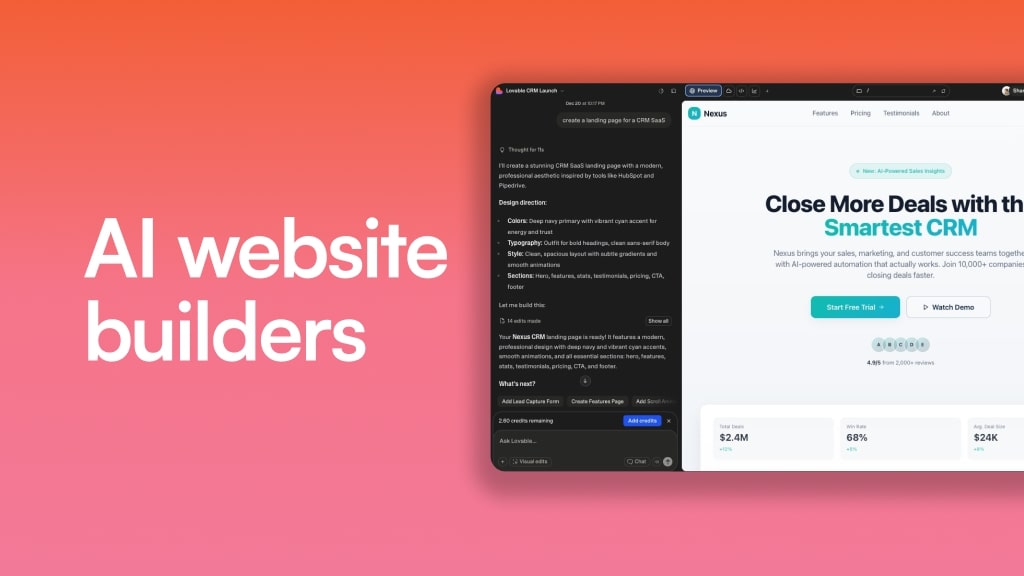
There are so many AI website builders out there that it’s so hard to find the right tool.
Well in this article, I’m going to show you the best AI website builders I have found (and actually used).
No one is paying me to write this and none of the results are sponsored. It’s just me, a regular guy who loves marketing and web development, giving you my honest opinion on the best AI tools.
Also, I used to work at a website builder company. So I’m confident my insights come from a place of experience and a genuine desire to help others create websites, whether that’s for yourself or for a business.
Back in 2019, I got to work my dream job leading SEO at the popular site builder company, Webflow.
Still to this day, it’s one of my favorite website builders of all time. I use it for this website you’re currently on right now.
But I will admit that it’s not the easiest thing to use.
And with all of these new AI website builders, I thought it would be time to get out of my shell and start experimenting.
Over the past 10 months, I’ve been going head first into AI tools. I’ve tested everything under the sun — from AI SEO tools to AI ad generators.
Within that range, I’ve come across some of the best AI website generators that have actually blown my mind.
So in this article, I want to show you the top website builders I’m using in 2026. These will range from beginner tools to premium expert ones.
Whether you want to start a blog for your kid’s local baseball team, or create a website for a fortune 500 company, you’ll find an AI website builder that will work for you.
I’ll explain what (and who) each one is best for, its key features, and top use cases.
Okay, let’s dig in.
AI website builders comparison
Here are the top AI website builders compared:
Okay, now let's go over everything you need to know about each one.
What is an AI website builder?
An AI website builder is a tool that allows you to quickly generate website designs and a production-ready website by using an AI model. It works by connecting to an LLM like ChatGPT, Claude, or Gemini and it can create a full website simply by you talking to it in natural language.
Some of these tools help you create simple websites, while others feel more like a full web development platform that allows you to create prototypes and even production-ready sites.
For example, a platform like Webflow, which is traditionally a regular website builder, now has AI features to help you spin up technical SEO and even designs for your website. This also goes for the platform Framer, which has grown quite a bit over the past couple years.
But there are also other newer tools that have started as an AI website builder from day one. Tools like Lovable or Bolt are popular tools that are AI-first. You simply talk to it like you would with ChatGPT and it will spin up any website you need.
And the cool thing about many of these platforms is that they are free AI website builders. So you can start producing landing pages without having to pull your credit card out. However, almost all these website builders require you to pay once you want to launch your website on a custom domain.
I'll go over more about all this in the rest of the article, so no worries. Before I dive into my full list of my favorite AI website builders, let me go over how they actually work.
How does an AI website builder work?
An AI (Artificial Intelligence) website builder works by integrating with an LLM (Large Language Model) to help you build websites in seconds, without having to know how to code.
Traditionally, you either use a platform like WordPress or you custom-coded a website with React, and then you would use other tools and integrations to build out the designs, different elements like intake forms, and also a separate tool for hosting the site.
And then many of these platforms realized that it was hard for people who didn't know how to code to build beautiful-looking sites. So they started offering templates. And this is how I started. I initially built my WordPress website back in 2016 using a template.
But templates can have their limitations. Sure, you can use WordPress with a plugin like Elementor to create a drag-and-drop editor for designs. But sometimes the design experience just isn't quite how you like it.
But now that problem is pretty much solved with an AI site builder. Instead of using templates, you just speak your designs into existence. Or with some of these tools, as you'll see in this article, you can use a Figma file or screenshots from places you find design inspiration and feed those into the AI to recreate them for you.
What are the benefits of using an AI website builder?
The benefits of using an AI website builder is that it empowers you to create, not only quickly, but also to the exact specifications that you envision in your head.
Often, we creators have great ideas. But our limitations with knowing how to code and understanding all the confusing tech that comes with it stops us from realizing those ideas.
This is why AI builders are so great. Here are some of the benefits I've personally seen using an AI website builder:
- I can quickly spin up designs based off of mockups that I create in Figma
- I can create landing pages at scale without having to recreate them in a traditional site builder
- More advanced AI website builders allow you to add more functionality to your site without needing to code. For example, you can create custom tools for your visitors or even turn your websites into full-blown web applications
At the end of the day, I think the aim of most of these AI website builders is that they're trying to help small businesses build websites faster, better, and cheaper.
That's what AI is great for.
But to get the most out of this, you need to come into these platforms with a vision of how you want your AI-powered website to look and feel like.
What are the limitations of AI website builders?
AI is great at taking data and synthesizing it in whatever way you like. This is why the best use case of AI is coding. It's very logical and all these elements are trained on all the web development principles.
But the limitation of not only these AI website builders but any AI tool in general is that they're not always the best at recreating the vision you have in your mind.
The less details AI has about what you want it to do, the more it can hallucinate and make you frustrated that your designs feel off.
Some of these website builders also don't have full context on previous pages or code that they have generated. So if you go in and try to make a design tweak, it can sometimes create weird bugs or errors.
And the other issue is that most people are inherently lazy. So they're just going to open up one of these AI website builders and type in a prompt like "make me a good-looking website." What will happen is that your website will look like every other AI-generated site.
So to combat this, you need to build your site piece by piece and give it as much context as you can. You never want a one-shot prompt for a tool to create a full landing page or website from scratch. Start piece by piece.
Okay, now that we have gone over that, let me show you the best AI website builders right now.
10 popular AI website builders you have to try in 2026
Here are the best AI website builders:
Okay, let's take a deeper look at each one.
1. Relume
- Who it's for: Professional web designers and developers working with Webflow or React
- What I like: Best-in-class SEO and web performance, AI-powered design systems and wireframes, seamless Webflow integration
- Pricing: Free plan available, paid plans start at $26/month
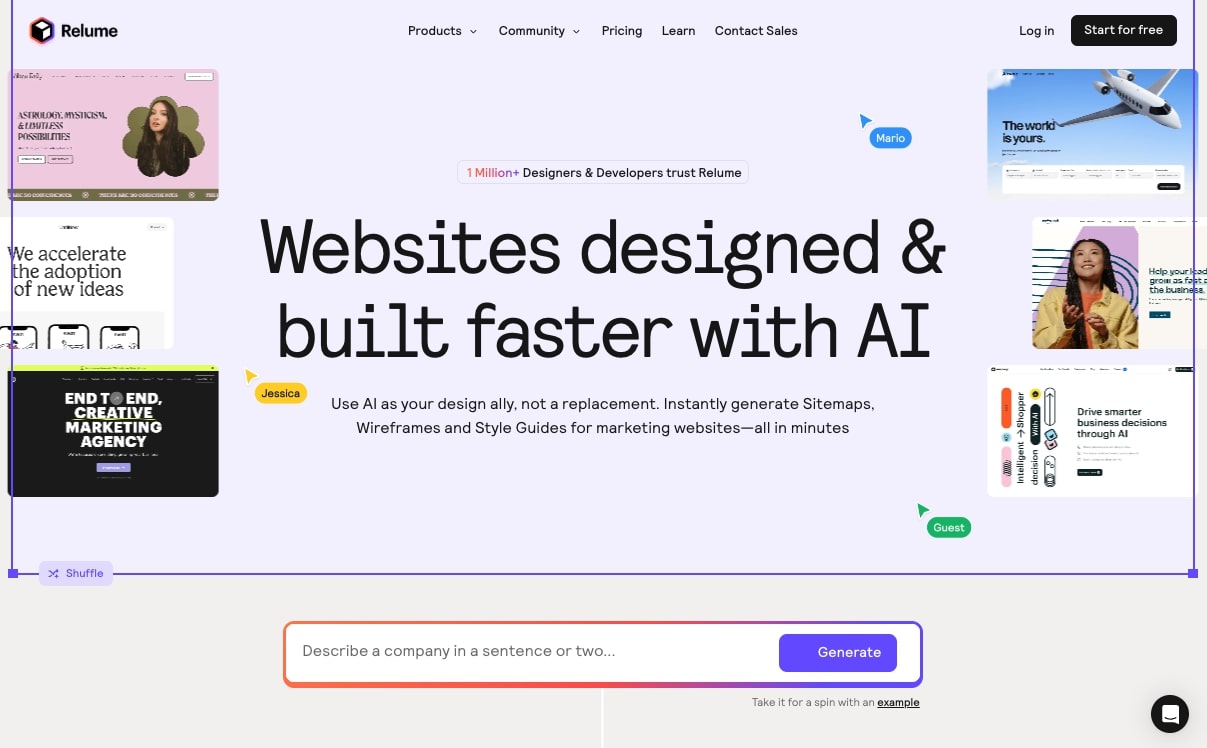
Relume is an AI website building framework that is built for professional web designers and developers. It’s one of the best AI website builders when it comes to SEO and web performance in my opinion. Mostly because Relume is actually a framework for building sites. And that is used to build websites faster on platforms like Webflow, Framer, and React custom code.
I’ve used it for creating sites for my clients. Just check this out, it’s a client site that I’ve grown the SEO traffic for recently — built with the help of Relume:
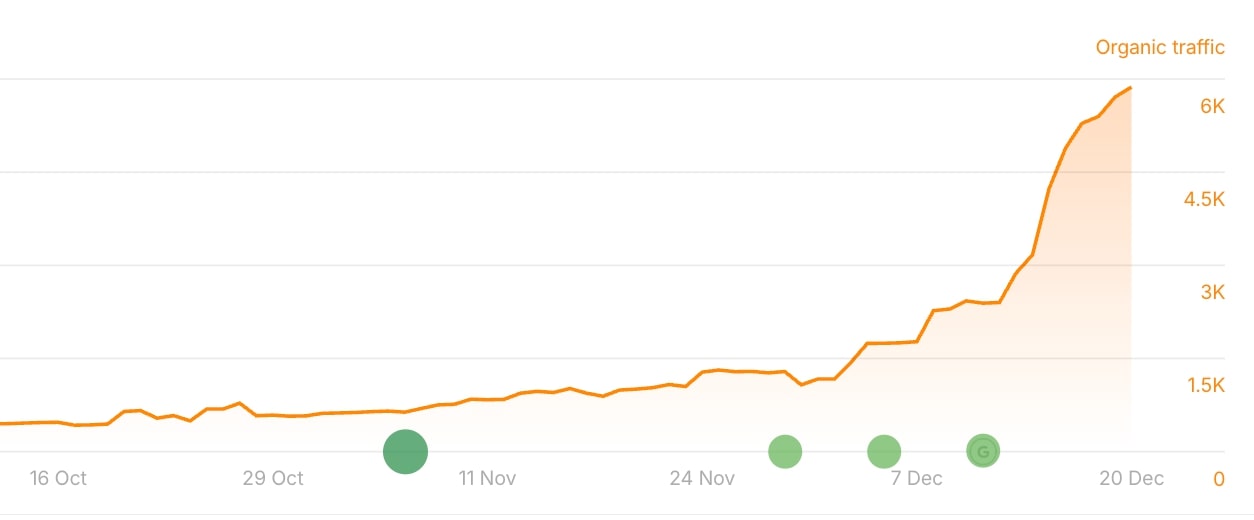
I first discovered Relume back when I was leading SEO initiatives at Webflow, and at the time, the company was a web design and development agency.
But today, they are a full AI component library for traditional website builders like Webflow and React.
It makes it easy to use AI to generate wireframes and sitemaps. This way, you can quickly plan out the structure of your website and also the way the pages will look. Think of it as an AI planning tool that can sketch out what your website architecture will look like.
Then, you can import that wireframe into Webflow, custom React code, or Figma.
How Relume works
Relume works by letting you first type out in natural language what your website is and how many pages you want it to be. It will then generate a design system and give you options to structure your web pages.
So for example, you can have a landing page and add a hero section, create a testimonial section, feature sections, and any element of a standard web page.
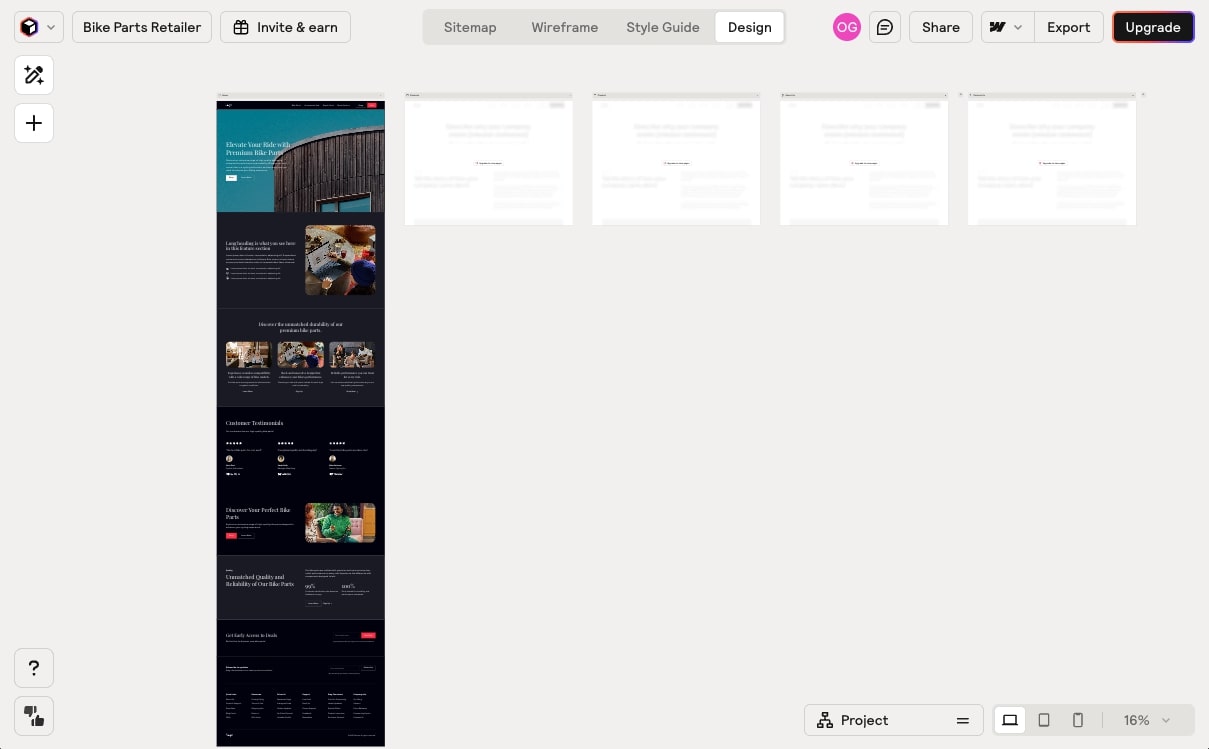
It’s all done with AI. You create a wireframe of the site, and then you create the layouts of the individual pages. And all of it is on brand because you first use the AI to generate a design system.
From there, you one click export it into a Webflow project. And from there, you can click publish and you’re good to go.
Who is Relume for?
Relume is great for those working with either Webflow websites or using custom React code. But I would say it’s best for web designers and developers working with Webflow.
Webflow on it’s own is a powerful website builder. But its limitations with AI make it hard for beginners to create custom websites (without using a template).
Relume solves that problem by helping you use AI to generate all the hard stuff. And then you can publish to Webflow to get all the hosting and SEO benefits that the platform has.
This route is the one I mostly use for serious business websites. And my own site, Marketer Milk, is built all in Webflow. Just check out the traffic:

Yeah, really powerful.
But, there are newer tools that I think can do what Relume + Webflow can do, but it’s all in one platform. So we’ll get to those as well.
Relume pricing
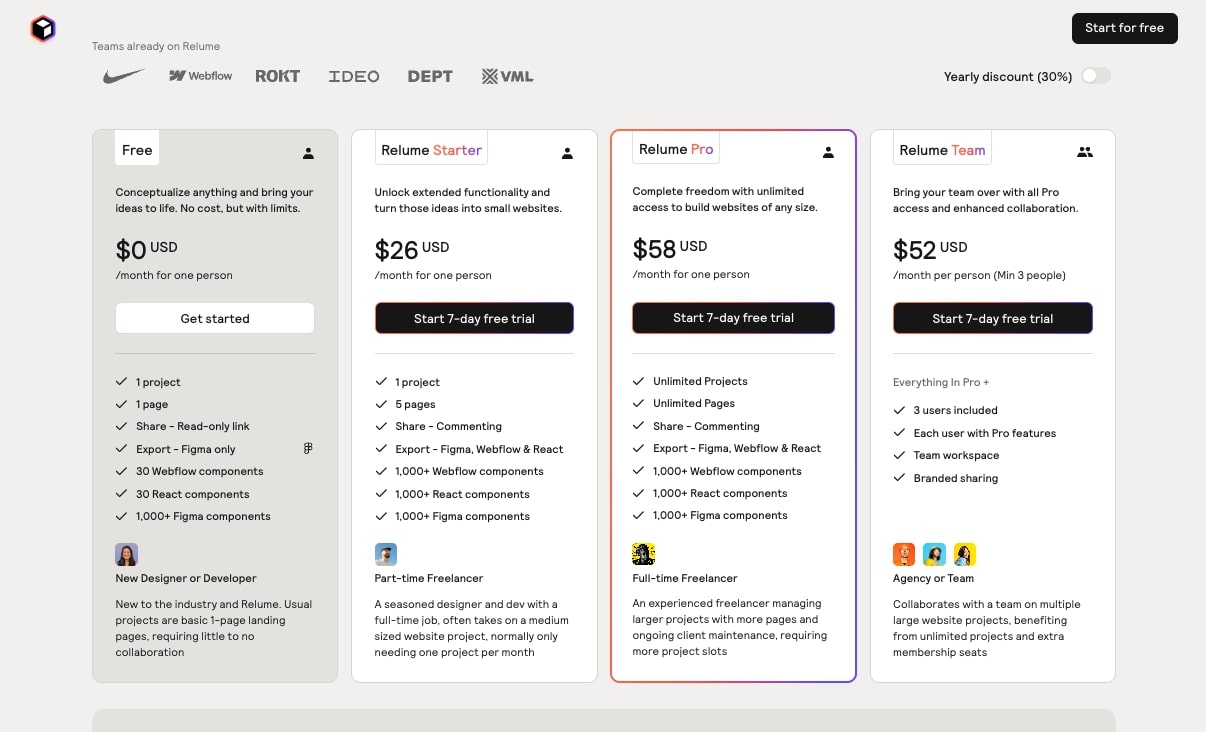
Here are Relume's pricing plans:
- Free: $0/month with 1 project, 1 page, read-only sharing, Figma export only, 30 Webflow components, 30 React components, 1,000+ Figma components
- Starter: $26/month with 1 project, 5 pages, commenting, export to Figma, Webflow & React, 1,000+ components across all platforms
- Pro: $58/month with unlimited projects, unlimited pages, commenting, export to Figma, Webflow & React, 1,000+ components across all platforms
- Team: $52/month per person (minimum 3 people) with everything in Pro plus 3 users included, each user with Pro features, team workspace, and branded sharing
You can learn more about what each plan includes on their pricing page.
Relume pros and cons
Here are the pros to using Relume:
- Create design systems with AI for consistency across all your web pages
- Use AI to quickly build sitemaps and wireframes
- Get the benefits of using Webflow as a powerful site builder
- The best for SEO and hosting speed, through Webflow
Here are the cons to using Relume:
- It’s only good for Webflow websites, so you’re locked in there
- It can be a bit expensive for hobbyists, and is built for professional business websites
- Is focused more on site structure and layouts over fancy designs
Overall, Relume is an amazing platform if you already use Webflow or you want to use it as your platform of choice. It makes it super easy to ship pages on Webflow that are built correctly and optimized for SEO and AEO.
But the downside is that you are limited to just Webflow.
Relume rating and reviews
Here are what others say about Relume on third-party review sites:
- Product Hunt: 4.8/5 star rating (from +25 user reviews)
- G2: 3.6/5 star rating (from +6 user reviews)
2. v0
- Who it's for: Front-end and full-stack developers, plus marketers who want to prototype and build complex websites without coding
- What I like: Beautiful modern UI with Shadcn, ability to switch between LLM models, incredible for vibe coding and prototyping
- Pricing: Free plan available, paid plans start at $20/month
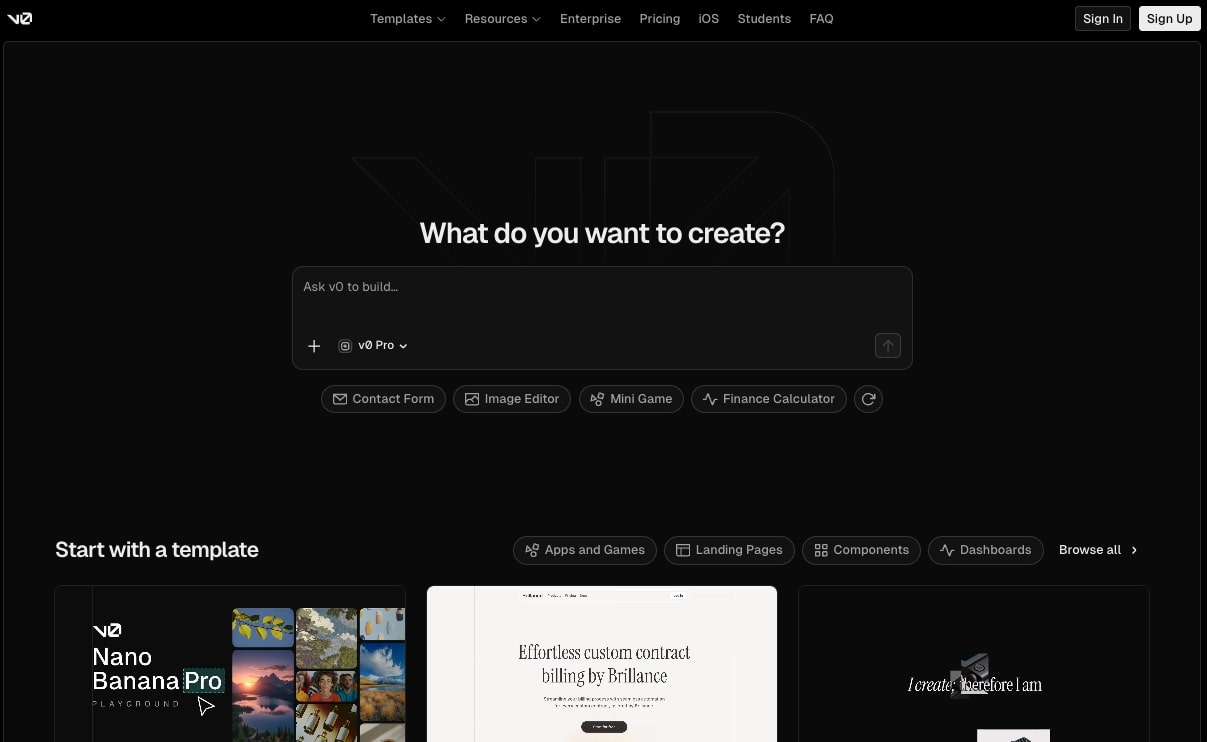
v0 is an AI website builder that has quickly become one of my favorite AI tools of all time. I use v0 almost every day for prototyping dashboards and web apps. It's also a great tool for designing beautiful-looking websites really fast.
v0 is created by Vercel, the popular hosting platform for developers. So if you're working with a company that has a SaaS website hosted by Vercel, then v0 is an amazing platform to learn how to use.
The great thing about v0 is that it uses Shadcn, so all the components and dashboards are super modern and clean. You can also import your own designs and switch between LLM models when creating in v0.
It's as easy as using ChatGPT. You simply ask v0 what you want to build and it'll walk you through the whole process. And from there, you can easily publish the site on a Vercel subdomain. Or you can add your own custom domain.
The platform is also free to use, but you end up paying once you start prompting it a lot (which is the case for most of these AI website builders).
How v0 works
v0 works by a user describing what they want to build with a prompt. You can also start with a template created by the community. They have templates for SaaS landing pages, blogs, ecommerce, dashboards, auth screens, and more.
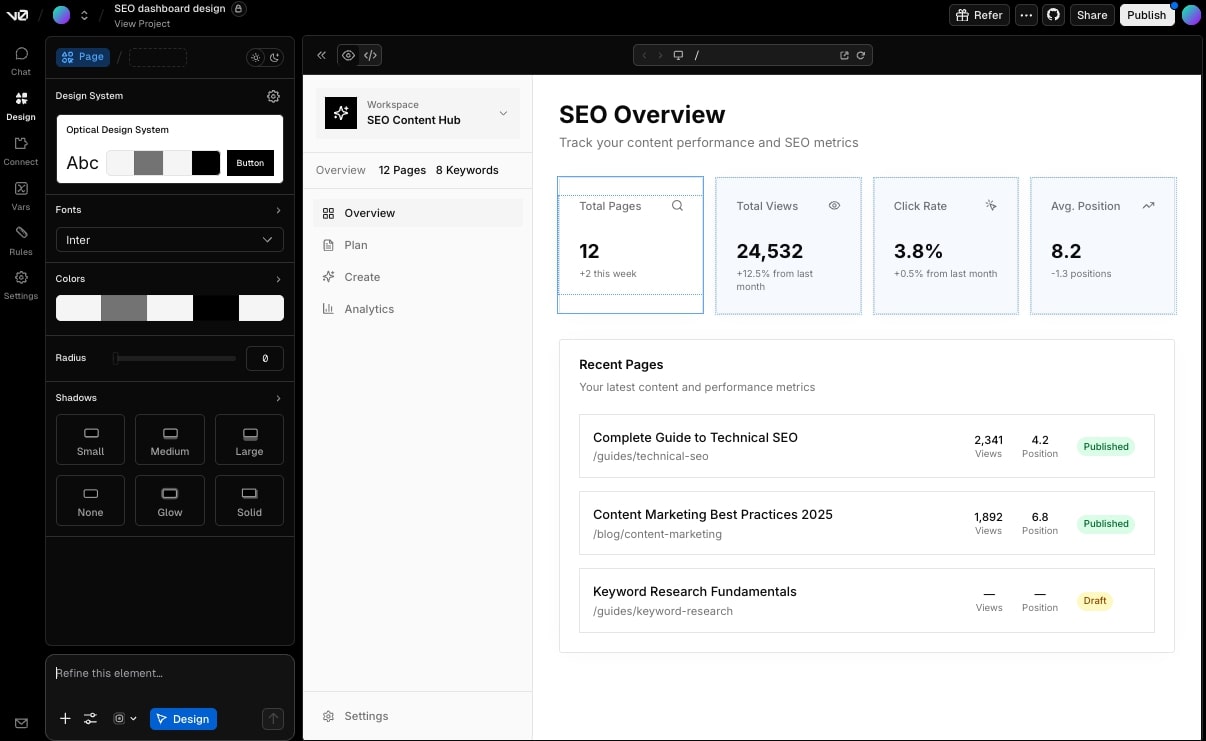
v0's AI then generates the website live. You can see the code behind the designs as well as a preview of what the site actually looks like. And from there, you can either make tweaks by continuing to prompt it or you can go in "design mode" and start manually editing the designs on top of what the AI produced.
You can also sync v0 to a GitHub repo if you're a developer or you're working with engineers.
Who is v0 for?
v0 is originally best for front-end and full-stack web developers that want to quickly speed up UI design and development. It can also help with scaffolding of a web app.
But it's also great for marketers that want to learn how to prototype and build complex websites without having to code. If you're a marketer, like me, I highly recommend you start playing around with v0.
Again, this isn't sponsored (although if the Vercel team is reading this, hit me up lol), but I think it's one of the best tools for vibe coding. In fact, if you read my marketing trends article, you'll know that I'm seeing a huge trend in marketers becoming product managers and designers.
And v0 is one of those tools that I think can help you become a top 1% marketer and stay ahead of the game.
v0 pricing
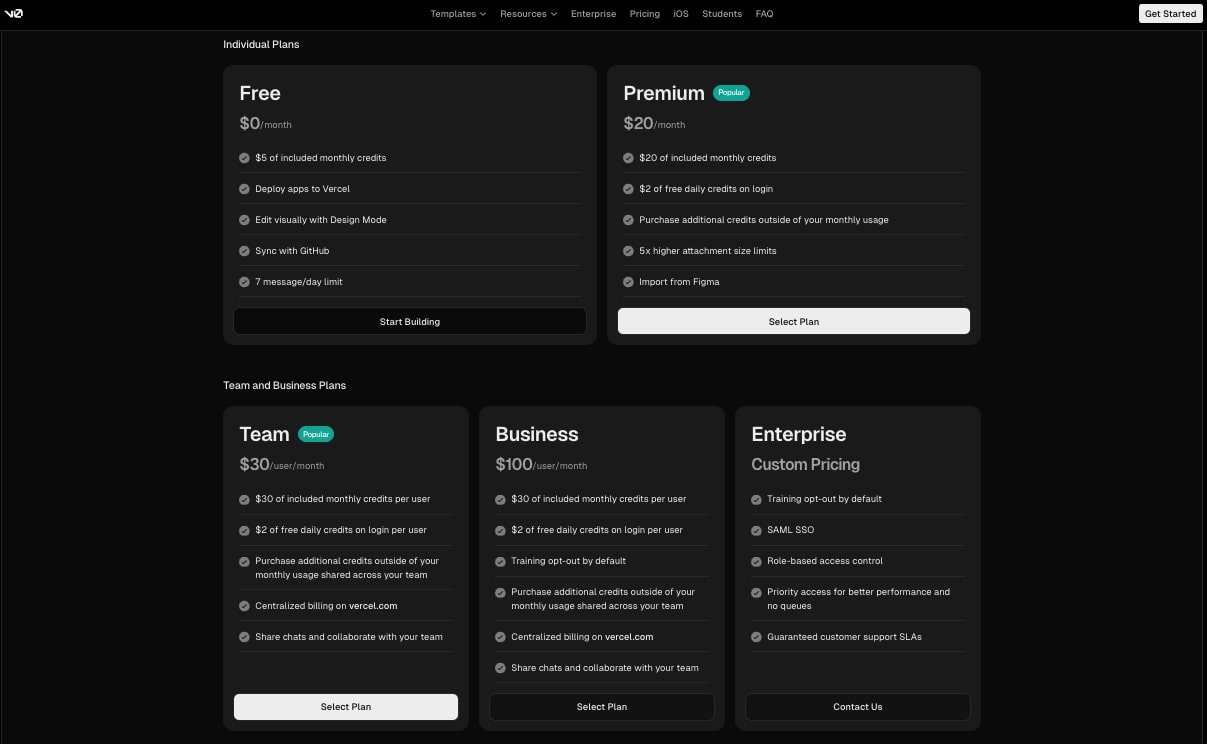
Here are v0's pricing plans:
- Free: $0/month with $5 of included monthly credits, deploy apps to Vercel, edit visually with Design Mode, sync with GitHub, 7 message/day limit
- Premium: $20/month with $20 of included monthly credits, $2 of free daily credits on login, purchase additional credits, 5x higher attachment size limits, import from Figma
- Team: $30/user/month with $30 of included monthly credits per user, $2 of free daily credits on login per user, centralized billing, share chats and collaborate with your team
- Business: $100/user/month with $30 of included monthly credits per user, training opt-out by default, centralized billing, team collaboration
- Enterprise: Custom pricing with training opt-out by default, SAML SSO, role-based access control, priority access, guaranteed customer support SLAs
You can learn more about what each plan includes on their pricing page.
v0 pros and cons
Here are some of the pros of v0:
- Allows you to quickly build beautiful UIs with AI
- You can alternate between Vercel's built-in agent or the latest and greatest LLM model
- An amazing vibe coding tool for creating prototypes and integrating with a Supabase backend
- It can handle APIs and is really a full-stack website platform
Here are some of the cons of v0:
- You get locked into the Vercel ecosystem, so if you want to host your site elsewhere, you need to have an engineering background
- The code can get a bit messy for larger projects
- If you don't prompt the designs properly, or import your own Figma design, your site can look like other typical vibe-coded sites
v0 rating and reviews
Here are what others say about v0 on third-party review sites:
- G2: 4.7/5 star rating (from +47 user reviews)
- Capterra: 4.4/5 star rating (from +47 user reviews)
3. Framer AI
- Who it's for: Designers, marketers, and no-code creators that want a visual website builder
- What I like: Fast website layout generation, ability to manually edit AI-generated designs, huge template library
- Pricing: Paid plans start at $15/month
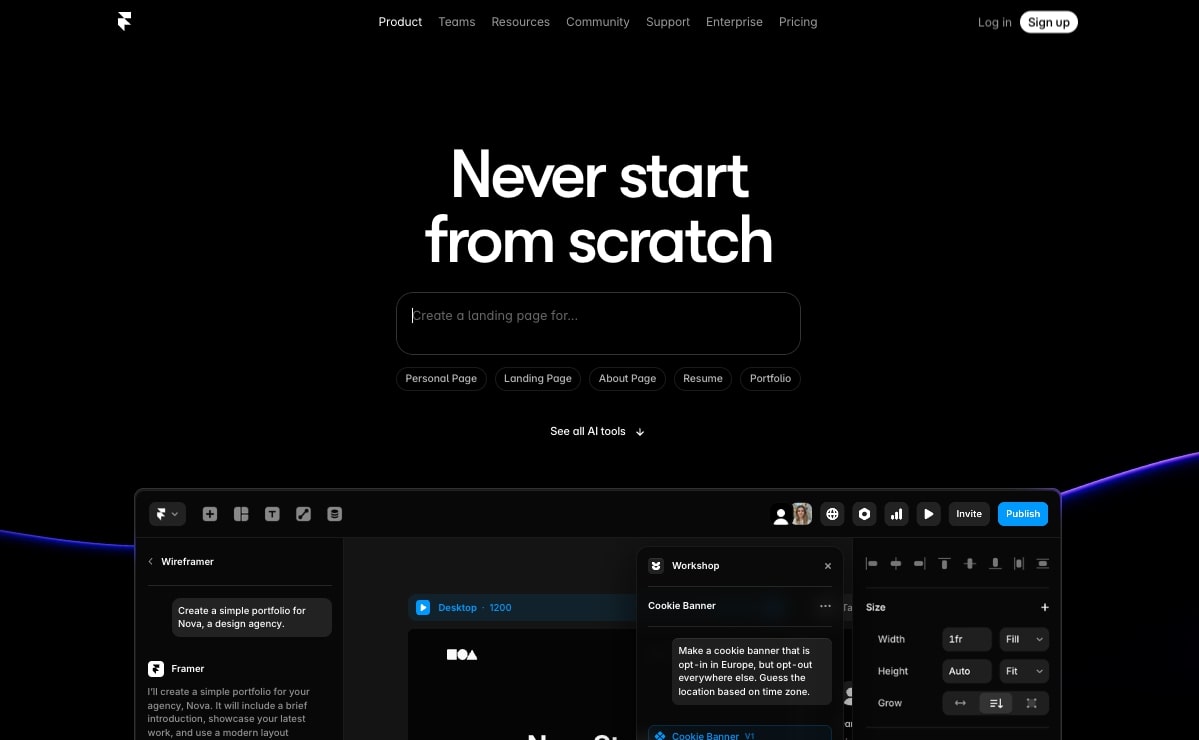
Framer AI is a website building tool designed by Framer. Traditionally, Framer has been a design tool and then it became a popular website builder that competed against Webflow.
It's quickly become an extremely popular platform for startups and small businesses that want to create beautiful-looking websites really fast.
But now with Framer AI, you can use natural language to spin up designs and manually edit them as AI creates the layouts. It's very similar to v0 and its ability to create websites, however it does have a full CMS built in so you can use this as a complete AI website builder.
How Framer AI works
Framer AI works by first creating a wireframe for your site. You simply speak to it the type of site you want to create, whether that's a portfolio, a blog, or a business website.
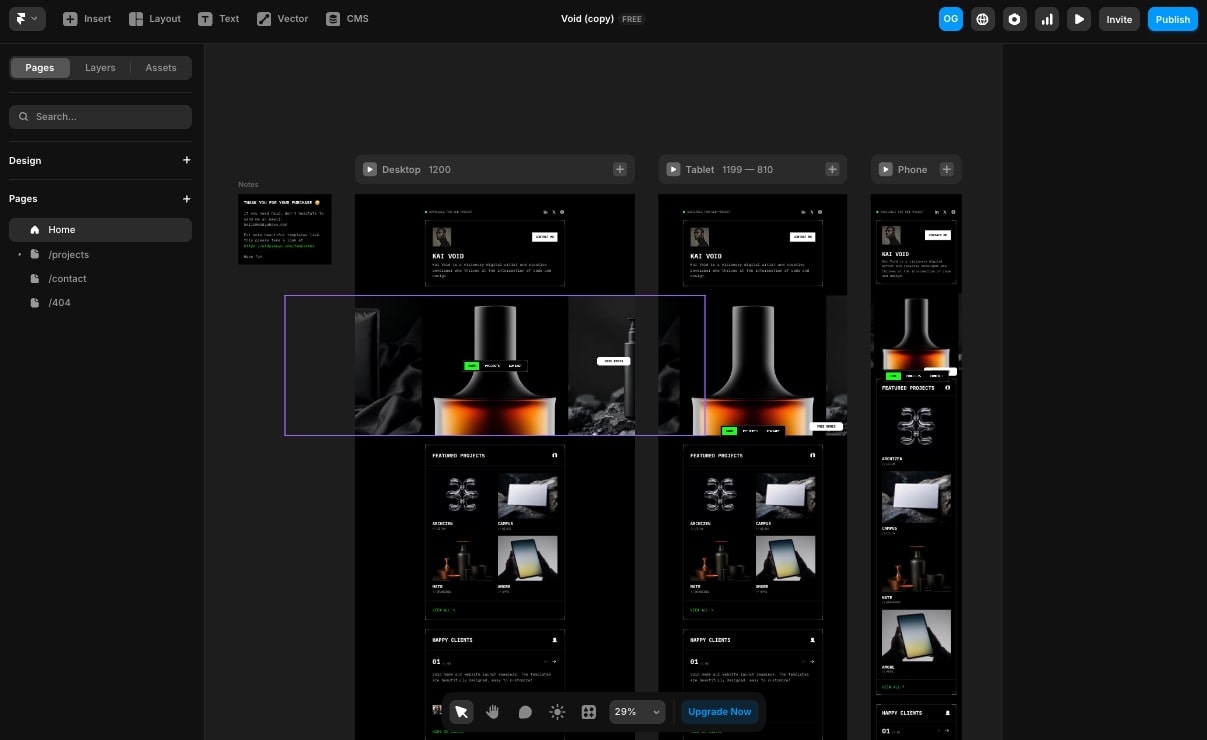
Then you go into Workshop mode where you can create or change different components on the site, with the help of AI. And from there, you can make design tweaks on the visual canvas that it gives you.
It's a true no-coding tool and one I think most people reading this article will use for normal websites.
Who is Framer AI for?
Framer AI is for designers, marketers, and no-code creators that want a visual website builder. It's also for those that want AI to help them with their layouts, structure, and content on their websites.
But what makes it great is that if you want to be able to edit what AI generates for you, then this is a platform you definitely want to check out.
And on top of that, there's a huge ecosystem of Framer creators on YouTube, so it's great for freelancers or agencies that are trying to create portfolios, landing pages, or marketing sites for other businesses. If you have been thinking about selling website services to clients, this is a platform you should definitely look into.
Framer AI pricing
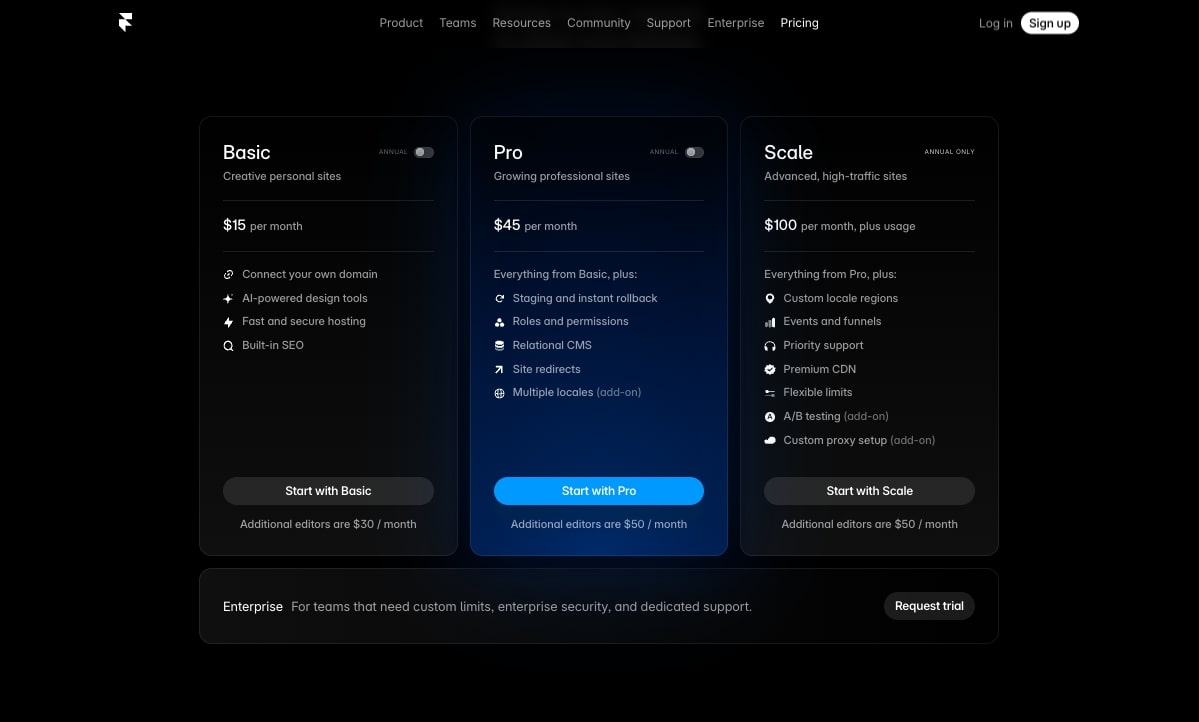
Here are Framer AI's pricing plans:
- Basic: $15/month with connect your own domain, AI-powered design tools, fast and secure hosting, built-in SEO (additional editors are $30/month)
- Pro: $45/month with everything from Basic plus staging and instant rollback, roles and permissions, relational CMS, site redirects, multiple locales add-on (additional editors are $50/month)
- Scale: $100/month plus usage with everything from Pro plus custom locale regions, events and funnels, priority support, premium CDN, flexible limits, A/B testing add-on, custom proxy setup add-on (additional editors are $50/month)
- Enterprise: Custom pricing for teams that need custom limits, enterprise security, and dedicated support
You can learn more about what each plan includes on their pricing page.
Framer AI pros and cons
Here are the pros of Framer AI:
- Great if you use Webflow or Figma, and are familiar with professional web design tools
- Really good at fast website layout generation
- Great for being able to manually edit designs after AI generates them for you
- Has a template library for any type of website, and they all look really good
- Includes a desktop app
Here are some of the cons of Framer AI:
- It's built specifically for websites, so you won't get the web app functionality with something like v0 or even the next tool on this list
- Framer is not known for its SEO performance, and I personally haven't seen a lot of Framer sites that get a ton of traffic from search engines (but that may just be because there's not a lot of great SEOs creating with Framer)
- The pricing can be a bit expensive if you need a CMS or blog on your website
Overall, Framer is great if you're trying to spin up a beautiful-looking website for a local business, a small startup, or your own portfolio. But if you want to build more complex websites like a media company or an ecommerce website that is focused heavily on SEO, it's probably worth looking into an alternative on this list.
Framer AI rating and reviews
Here are what others say about Framer AI on third-party review sites:
- G2: 4.5/5 star rating (from +134 user reviews)
- Capterra: 4.4/5 star rating (from +31 user reviews)
4. Lovable
- Who it's for: Beginners, small business owners, marketers, creators, and product managers wanting to build prototypes, marketing sites, or micro-SaaS projects
- What I like: Lightning-fast from idea to production, extensive theme and design controls, can build complex logic and full web applications
- Pricing: Free plan available, paid plans start at $25/month
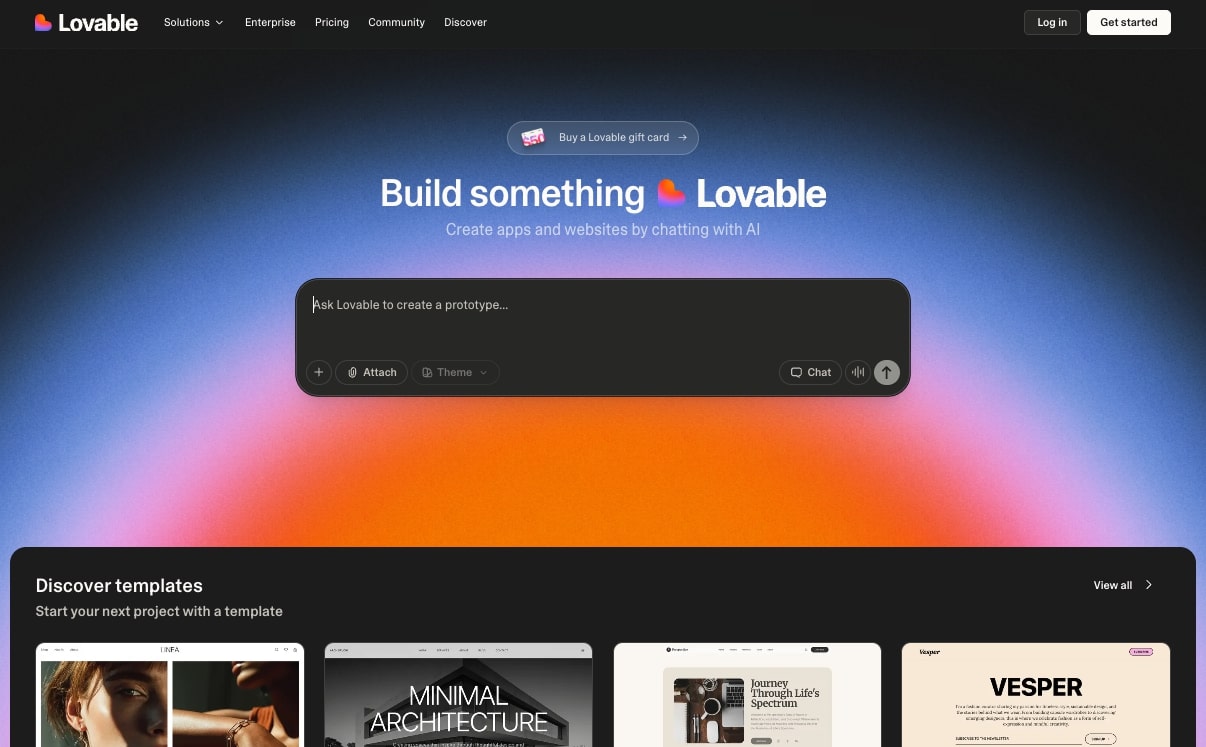
Lovable is a no-code AI website builder that allows you to create full-blown websites and web apps by simply chatting with AI. It's the most popular AI site builder right now, and is actually one of the fastest-growing startups of all time.
The platform allows you to build production-ready websites simply by talking to it like you would with ChatGPT. It has the vibe coding aspect of v0 but also the full website production suite of Framer.
So it's great for anyone looking to start vibe coding and building sites and web applications with AI. In fact, it's probably the best tool for absolute beginners.
How Lovable works
With Lovable, you simply start any project you want, whether that's a prototype for an internal tool or a website. You describe exactly what you want out of the website and Lovable then creates the user interface and logic.
For more complex sites that need a database, it can also integrate with Supabase to help you create web applications.
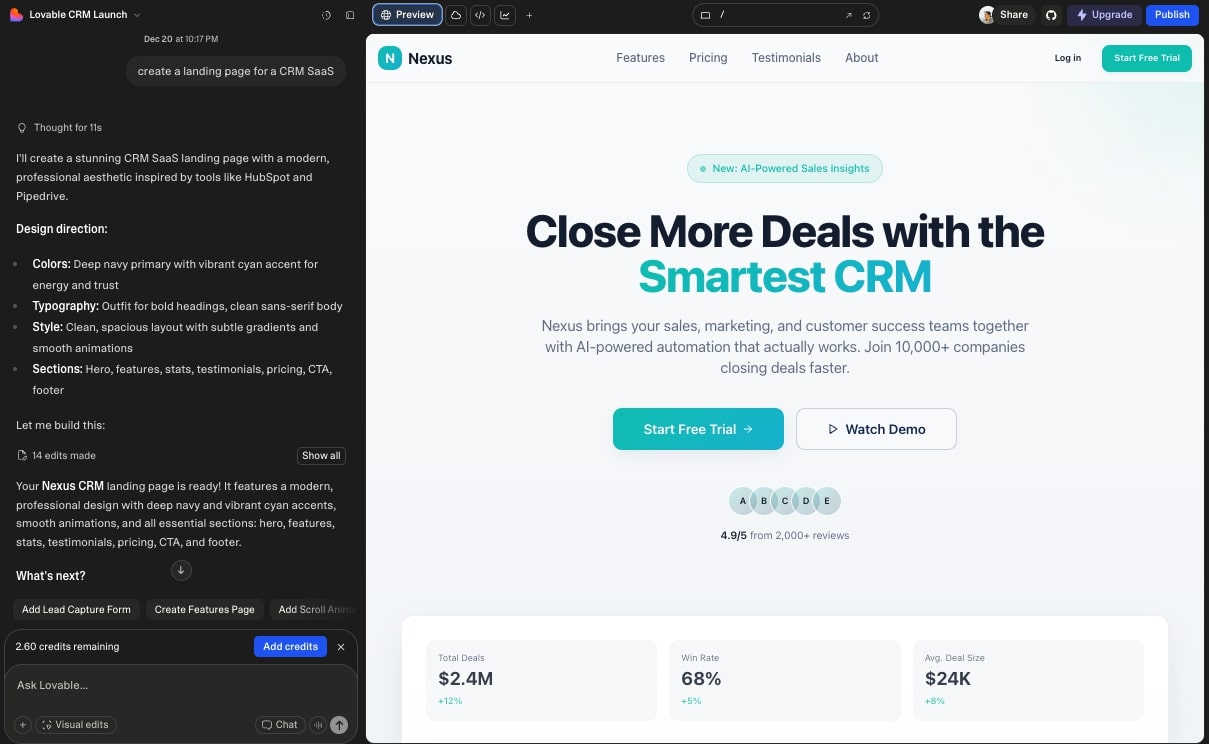
Similar to Framer AI, you can also edit the visuals and change the controls of your theme. And you can also integrate it with APIs to handle things like user logins and backend logic.
Who is Lovable for?
Lovable is best for beginners who want to dabble into their first AI website builder. It's great for small business owners, marketers, creators, and even product managers that want to ship prototypes, marketing sites, or even micro-SaaS projects.
Lovable pricing
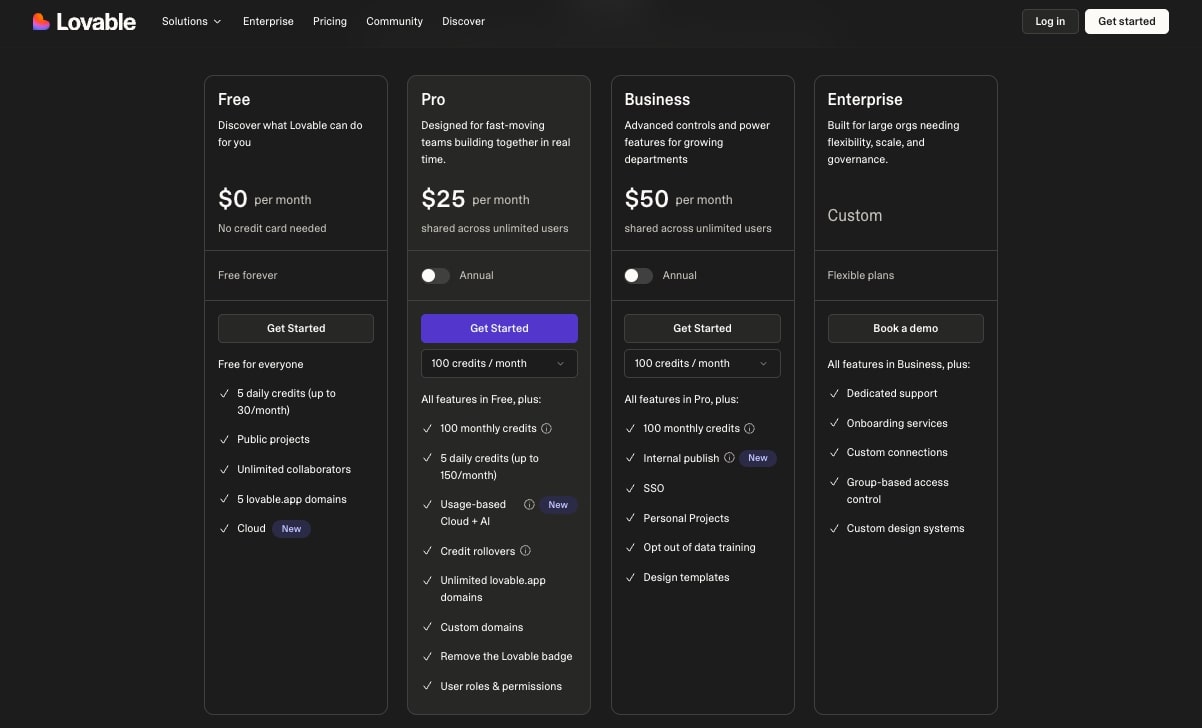
Here are Lovable's pricing plans:
- Free: $0/month with 5 daily credits (up to 30/month), public projects, unlimited collaborators, 5 lovable.app domains, Cloud
- Pro: $25/month (shared across unlimited users) with 100 monthly credits, 5 daily credits (up to 150/month), usage-based Cloud + AI, credit rollovers, unlimited lovable.app domains, custom domains, remove the Lovable badge, user roles & permissions
- Business: $50/month (shared across unlimited users) with 100 monthly credits, internal publish, SSO, personal projects, opt out of data training, design templates
- Enterprise: Custom pricing with dedicated support, onboarding services, custom connections, group-based access control, custom design systems
You can learn more about what each plan includes on their pricing page.
Lovable pros and cons
Here are some of the pros of Lovable:
- It's really fast at getting you from idea to production-ready website, using AI
- Gives you lots of theme and design edits, so you can tweak colors, components, and different layouts
- It has the functionality to build complex logic and full applications, a true vibe coding platform
Here are some of the cons of Lovable:
- Not the best for creating super complex web applications
- You're locked into Lovable's ecosystem, making it hard to host your site elsewhere
- You need a good understanding of how to write great prompts (I recommend you use ChatGPT to help you generate prompts on what you want to do and then copy and paste those into Lovable)
Overall, Lovable is an amazing AI website builder and it's probably the best for hobbyists that are trying to get more familiar with creating websites using AI.
Lovable rating and reviews
Here are what others say about Lovable on third-party review sites:
- G2: 4.6/5 star rating (from +181 user reviews)
- Capterra: 5/5 star rating (from +1 user review)
5. Orchids
- Who it's for: Marketers, PMs, developers, and founders who want to prototype full-stack websites and apps using AI
- What I like: Focus on full-stack development, huge library of modern design systems, can download full code base so you're not locked in
- Pricing: Free plan available, paid plans start at $25/month
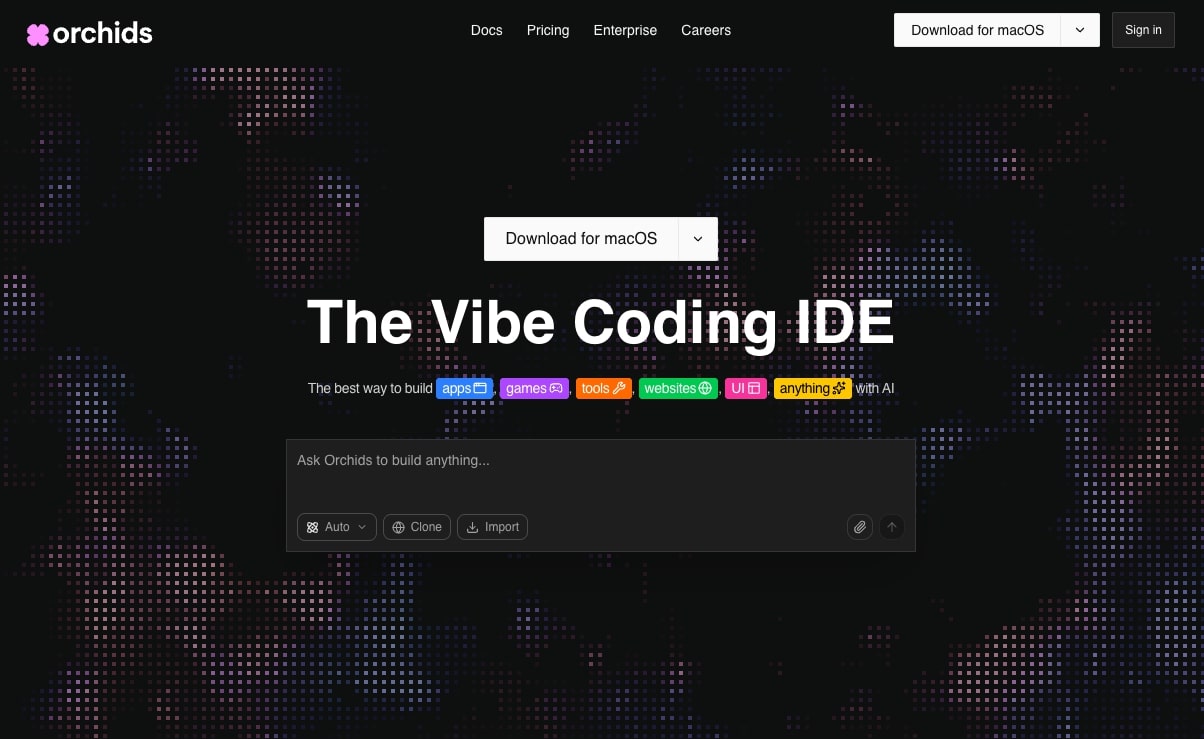
Orchids is the ultimate vibe coding IDE (integrated development environment). The messaging on the website speaks more to developers, but the platform is very similar to Lovable in that you can build anything from websites, apps, games, and UI mockups.
The platform is a bit different than Lovable in that you download the application to your computer, so you don't build websites in the browser like you normally would with a traditional website builder.
But Orchids is a very promising platform, and I don't see a lot of people talking about it. In fact, when it comes to its AI generation tools, it beats a lot of benchmarks compared to Lovable, v0, and other vibe coding tools.
How Orchids works
Orchids works by you first describing the website or app that you want to build. You simply chat with it and then the platform creates a plan for how it should approach your project.
From there, it uses AI to generate the designs and the code for you. Depending on the type of site you're building, it will also handle all the backend logic.
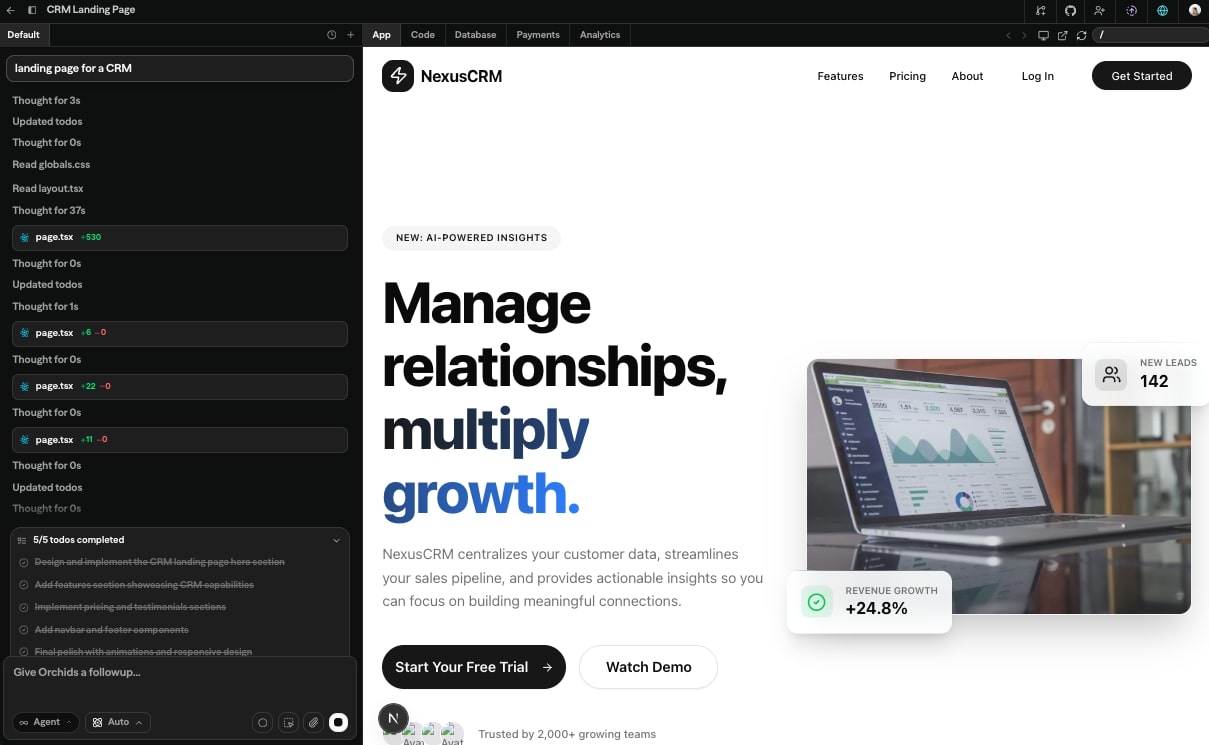
And similar to other vibe coding tools, you can iterate by giving it more prompts and reviewing what it outputs.
Who is Orchids for?
Orchids is best for marketers, PMs, developers, and founders who want to prototype a full-stack website and app using AI. It's great for creating the scaffolding of a website and applying any sort of business logic.
From there, anyone can use Orchids to ship different types of web pages and user interfaces, or launch full web apps. So if you just want a tool to generate some ideas of how you want to approach your next website project, this is a great tool.
Orchids pricing
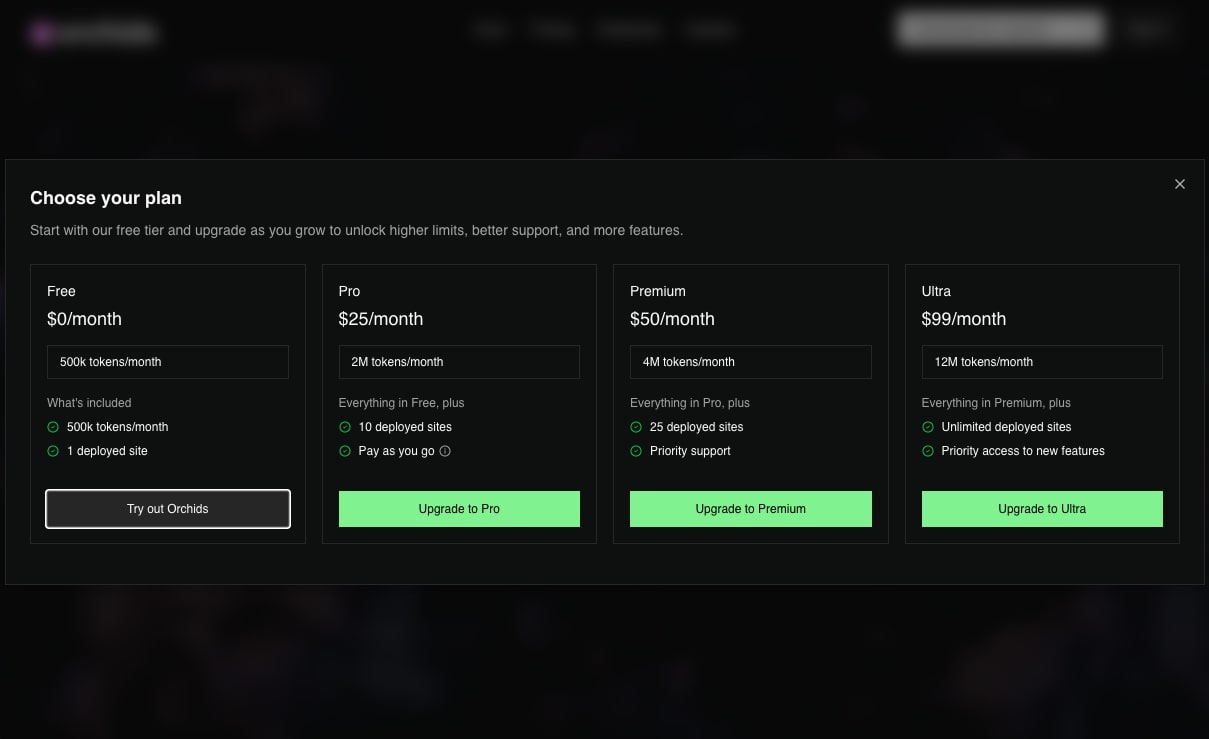
Here are Orchids' pricing plans:
- Free: $0/month with 500k tokens/month, 1 deployed site
- Pro: $25/month with 2M tokens/month, 10 deployed sites, pay as you go
- Premium: $50/month with 4M tokens/month, 25 deployed sites, priority support
- Ultra: $99/month with 12M tokens/month, unlimited deployed sites, priority access to new features
You can learn more about what each plan includes on their pricing page (click the pricing option in their navbar, it’s not a dedicated page).
Orchids pros and cons
Here are some of the pros of Orchids:
- It's focused on full-stack development, so it's more than just a landing page builder
- Orchids is strongly focused on the way things look, so there's a huge library of design systems that leverage Next.js and modern libraries
- You can download the full code base of any website you generate, so you're not locked into the platform
Here are some of the cons of Orchids:
- The platform uses a lot of credits when you're prompting it with AI, so the pricing can quickly rise for more complex websites with lots of pages
- It's not the best for beginners, and you'll get the most out of it if you have experience using other vibe coding tools
Overall, Orchids is a great platform if you have already used a tool like Lovable or Framer AI and you just feel like something is missing with them. I highly recommend playing around with it as it's really good at designing UIs and great-looking modern websites.
Orchids rating and reviews
Because Orchids is still fairly new, there are no public reviews on third party websites. However, there is a great review by Andy Nguyen that you can check out here.
6. Tempo Labs
- Who it's for: Designers and marketers looking to build full professional websites with AI, especially founders prototyping SaaS ideas with marketing sites
- What I like: Clean roadmaps and PRDs for large projects, manual design editing on top of AI generation, ability to import code base and push to GitHub
- Pricing: Free plan available, paid plans start at $30/month
Tempo Labs is another vibe coding AI website builder that I have used heavily. And when I mean heavily, I mean till 3:00 a.m. on some nights.
It was the first main vibe coding tool I fell in love with (before I started using v0), and I still think it's one of the best tools if you're trying to build a startup website. It's especially great for founders who want to prototype a SaaS idea while also building a marketing site on top of it.
The platform is also focused on design, so you can manually edit the designs that AI generates (similar to v0 or Lovable).
How Tempo Labs works
The platform works by you prompting it on what you want to build. From there, it generates a PRD that you approve. And after that, it starts building out the layout of your website and the AI writes all the code.
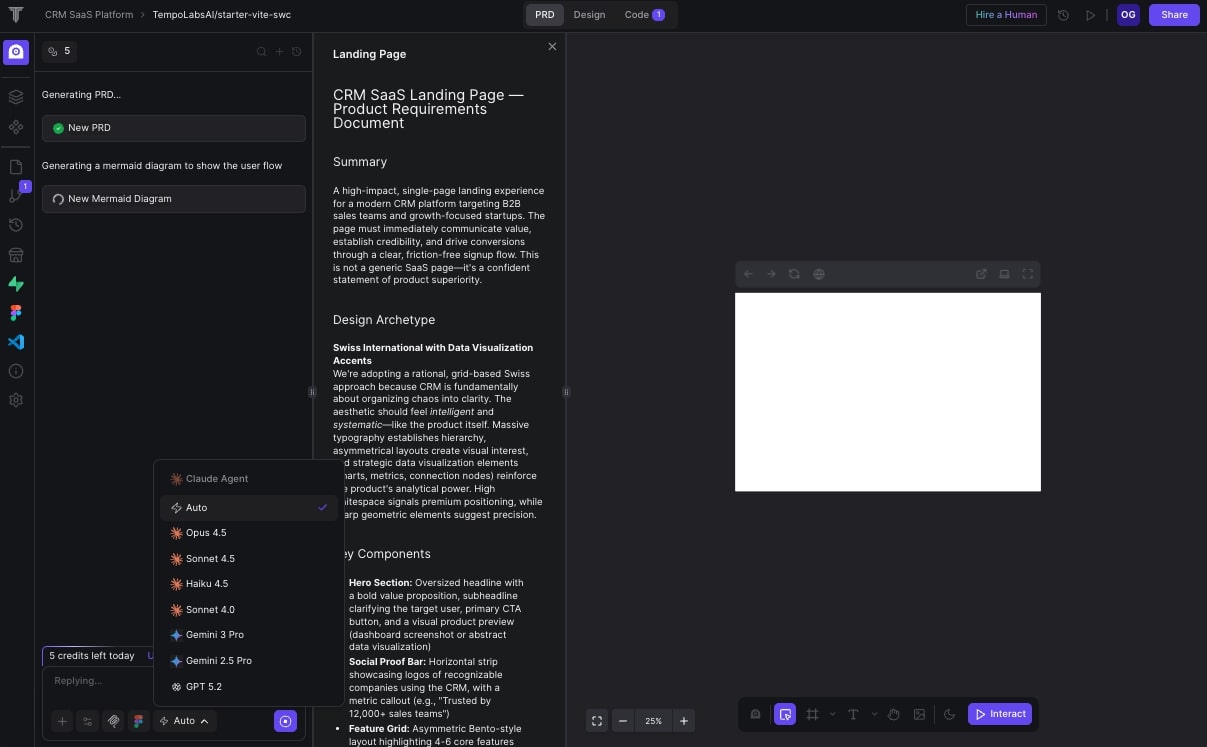
After that, you can view the design and make proper tweaks by either manually editing them or prompting AI to make the changes for you. You can also integrate it with Figma, so if you have a design in that platform, you can simply import the design so Tempo can code it up for you.
Who is Tempo Labs for?
Tempo is great for designers and marketers that are looking to build a full professional website with AI. It's not as easy as something like Lovable, but it does give you access to building design systems and editing code visually.
It's actually the platform that Webflow should be, which is no surprise that they are an investor in the tool.
Tempo Labs pricing
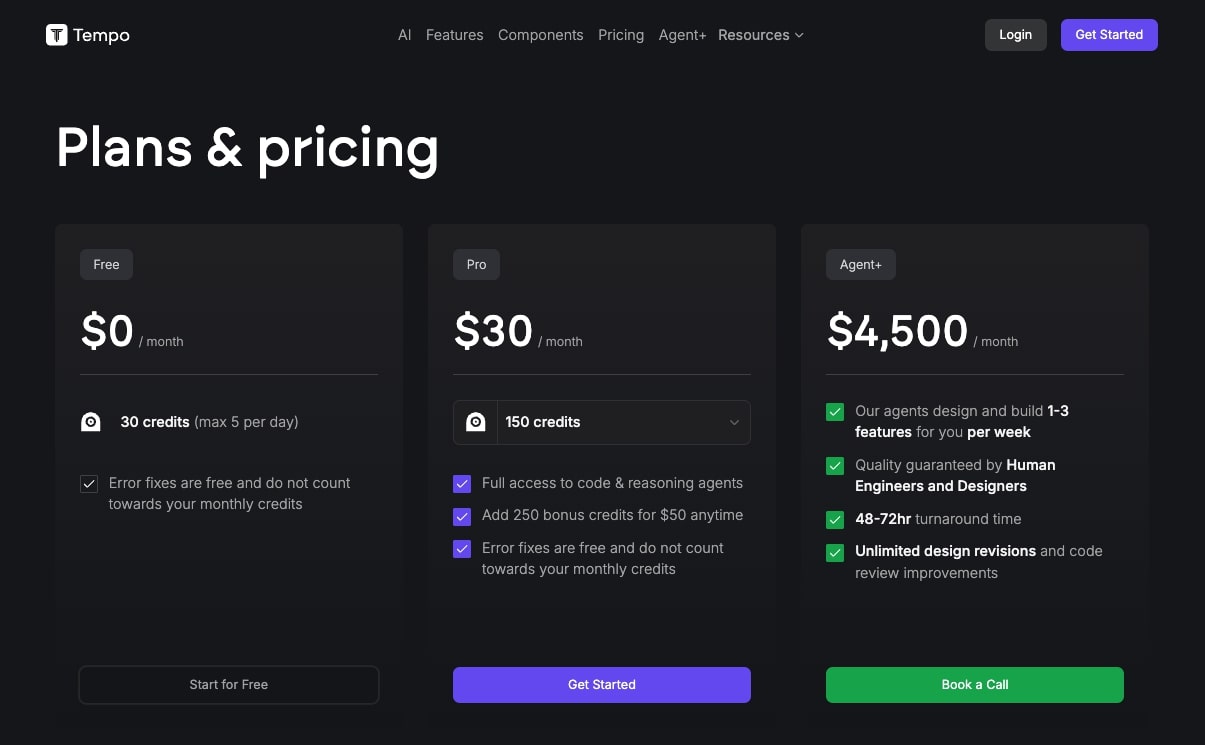
Here are Tempo Labs' pricing plans:
- Free: $0/month with 30 credits (max 5 per day), error fixes are free and do not count towards your monthly credits
- Pro: $30/month with 150 credits, full access to code & reasoning agents, add 250 bonus credits for $50 anytime, error fixes are free and do not count towards your monthly credits
- Agent+: $4,500/month with agents that design and build 1-3 features for you per week, quality guaranteed by human engineers and designers, 48-72hr turnaround time, unlimited design revisions and code review improvements
You can learn more about what each plan includes on their pricing page.
Tempo Labs pros and cons
Here are the pros of Tempo:
- Great for building clean roadmaps and PRDs for a large website project
- Amazing for manually editing the designs that AI generates
- Allows you to import your existing code base, open the code in VSCode, and also push it to GitHub
- Has a large library of templates and components, created by the community
Here are the cons of Tempo:
- It is more of a professional tool, so it may not be best for absolute beginners
- There is no built-in hosting for custom domain, so you need to deploy it onto a hosting platform like Vercel
- The pricing can get a bit expensive if you're using a lot of prompts
- The tool is very heavy, so it can feel a bit slow at times for the AI to generate your designs
Overall, Tempo Labs is an amazing platform if you're a web designer or a marketer and you want to prototype and vibe code websites and apps, but you're also open to learning more complex web development principles.
For example, when I first started using Tempo Labs, I had to go through the learning curve of using GitHub and deploying code onto a hosting platform like Vercel. It was a slight learning curve, but I'm glad I went through it because now I have a better understanding of true web development.
Tempo Labs rating and reviews
Here are what others say about Tempo Labs on third-party review sites:
- Product Hunt: 4.2/5 star rating (from +35 user reviews)
Because the platform is fairly new, there aren’t a lot of third-party reviews for it yet.
7. Atlas AI
- Who it's for: Founders building Shopify dropshipping websites and agency owners managing multiple ecommerce sites
- What I like: Verticalized specifically for dropshippers, does product research and writes copy, built-in CRO tools to boost conversions
- Pricing: Paid plans start at $49/month
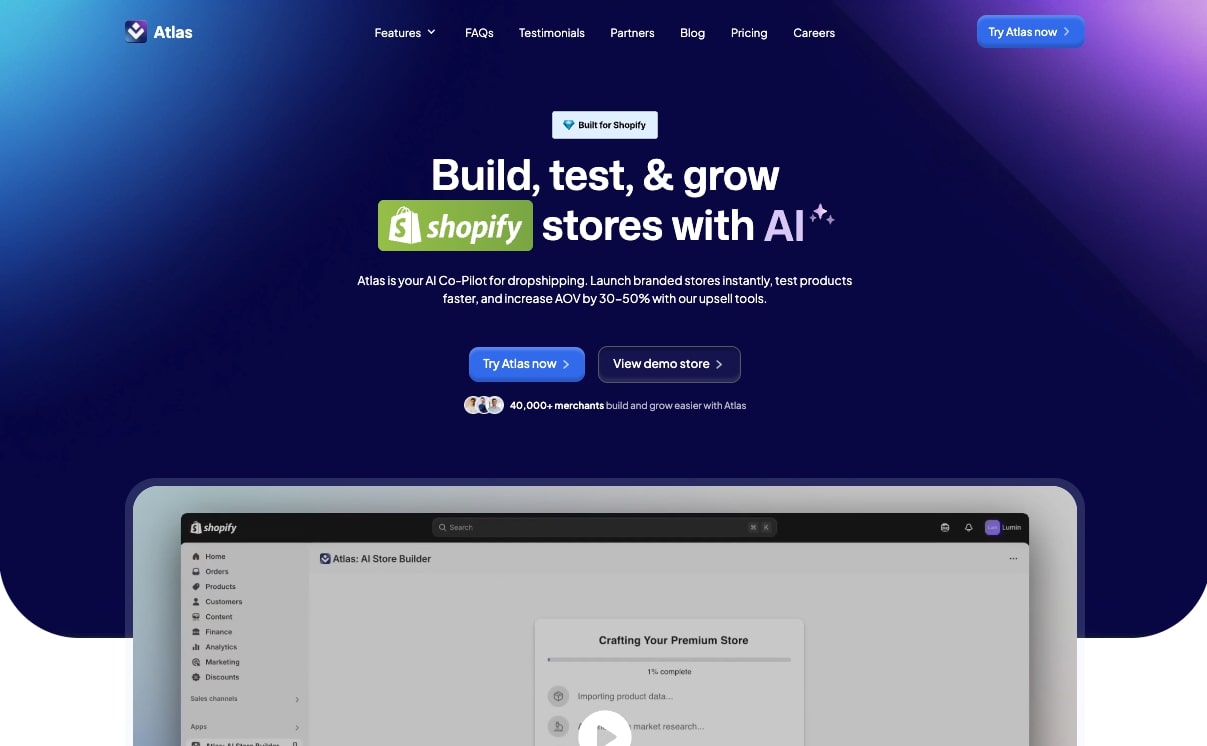
Atlas AI is an AI ecommerce website builder built for Shopify sites. It's developed by Sebastian Ghiorghiu, a popular YouTuber in the ecommerce and dropshipping space.
If you are using a Shopify website to sell ecommerce products, this is a great AI tool that can help you quickly spin up product pages, collection pages, and any part of your ecommerce site using AI.
How Atlas AI works
Atlas AI is dubbed as your co-pilot for building dropshipping stores. So this means that it works by you first pasting a product link for something you want to sell. Atlas then does all the research, writes the copy for your product pages, and generates a full Shopify website that is ready to launch.
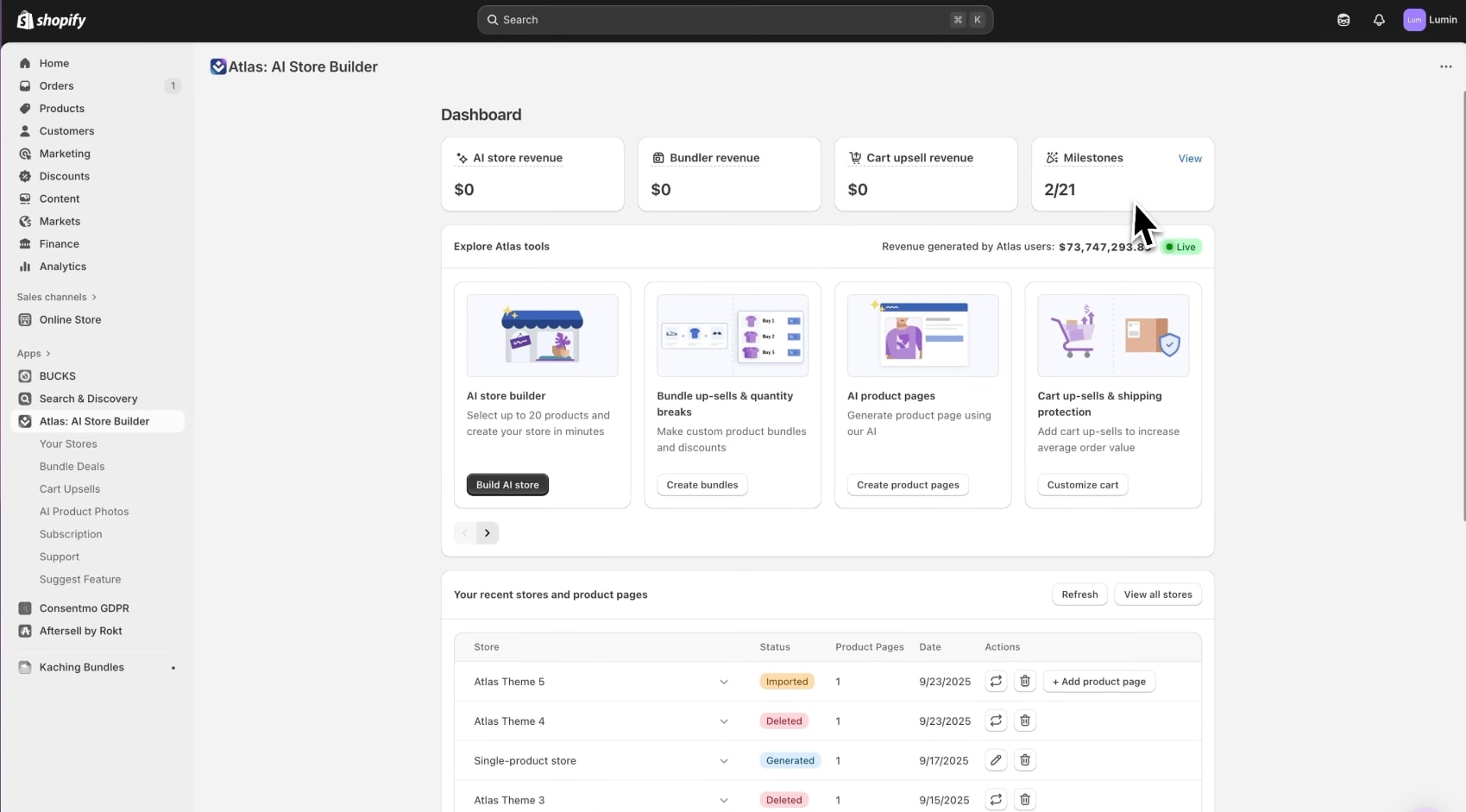
After the site has been generated, you can use Atlas to import products into your Shopify store and add custom layouts, colors, and your own design tweaks to fit your brand.
Who is Atlas AI for?
Atlas AI is best for founders who want to build Shopify dropshipping websites really fast. It's great if you want to test products through ads to see what works, without manually having to create new pages and do all of the operational stuff that comes with running a dropshipping store.
It's also great for agency owners that are managing multiple ecommerce websites who want to quickly ship new products and landing pages for their clients.
Atlas AI pricing
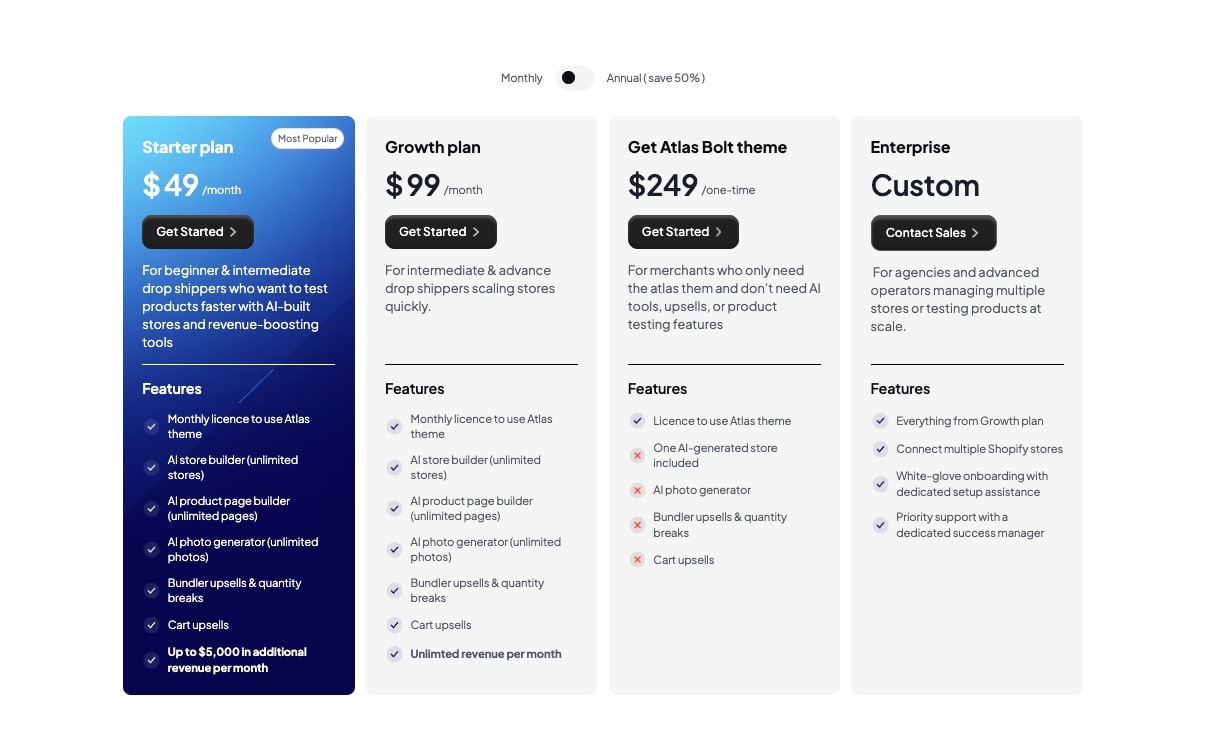
Here are Atlas AI's pricing plans:
- Starter: $49/month with monthly license to use Atlas theme, AI store builder (unlimited stores), AI product page builder (unlimited pages), AI photo generator (unlimited photos), bundler upsells & quantity breaks, cart upsells, up to $5,000 in additional revenue per month
- Growth: $99/month with monthly license to use Atlas theme, AI store builder (unlimited stores), AI product page builder (unlimited pages), AI photo generator (unlimited photos), bundler upsells & quantity breaks, cart upsells, unlimited revenue per month, Atlas Bolt theme
- Atlas Bolt theme: $249 one-time with license to use Atlas theme, one AI-generated store included, AI photo generator, bundler upsells & quantity breaks, cart upsells
- Enterprise: Custom pricing with everything from Growth plan, connect multiple Shopify stores, white-glove onboarding with dedicated setup assistance, priority support with a dedicated success manager
You can learn more about what each plan includes on their pricing page.
Atlas AI pros and cons
Here are the pros of Atlas AI:
- A very verticalized platform specifically for dropshippers using Shopify
- Is more than just an AI ecommerce builder, it can do the research and write copy for product links that you give it
- It's focused on converting site visitors into customers, so there are built-in CRO (conversion rate optimization) tools to help you grow your AOV (average order value)
Here are the cons of Atlas AI:
- While it's great for ecommerce websites, it may not be the best if you're a D2C brand that does not care about dropshipping
- The pricing can get a bit expensive
- The layouts and designs are built for conversions, so it may not be that flexible if you want to create something totally custom that looks different from other websites (but this could also decrease your conversions, depends on what you want)
Overall, Atlas AI is a promising platform and it's no wonder why it's become one of the most popular AI dropshipping tools on the market. It's a Shopify plugin, so you can easily start using it today if you're an existing Shopify user.
However, if you aren’t a dropshipper, but you still want an AI product landing page builder for Shopify, you should check out Replo.
Atlas AI rating and reviews
Here are what others say about Atlas AI on third-party review sites:
- Shopify App Store: 4.7/5 star rating (from +246 user reviews)
- Trustpilot: 4.8/5 star rating (from +63 user reviews)
8. DeepSite
- Who it's for: Non-technical users like marketers and designers, hobbyists tinkering with AI website ideas, and those who want to leverage DeepSeek
- What I like: One of the few AI website builders using DeepSeek, built-in SEO optimization features, cheaper than most competitors
- Pricing: Paid plans start at $14.99/month
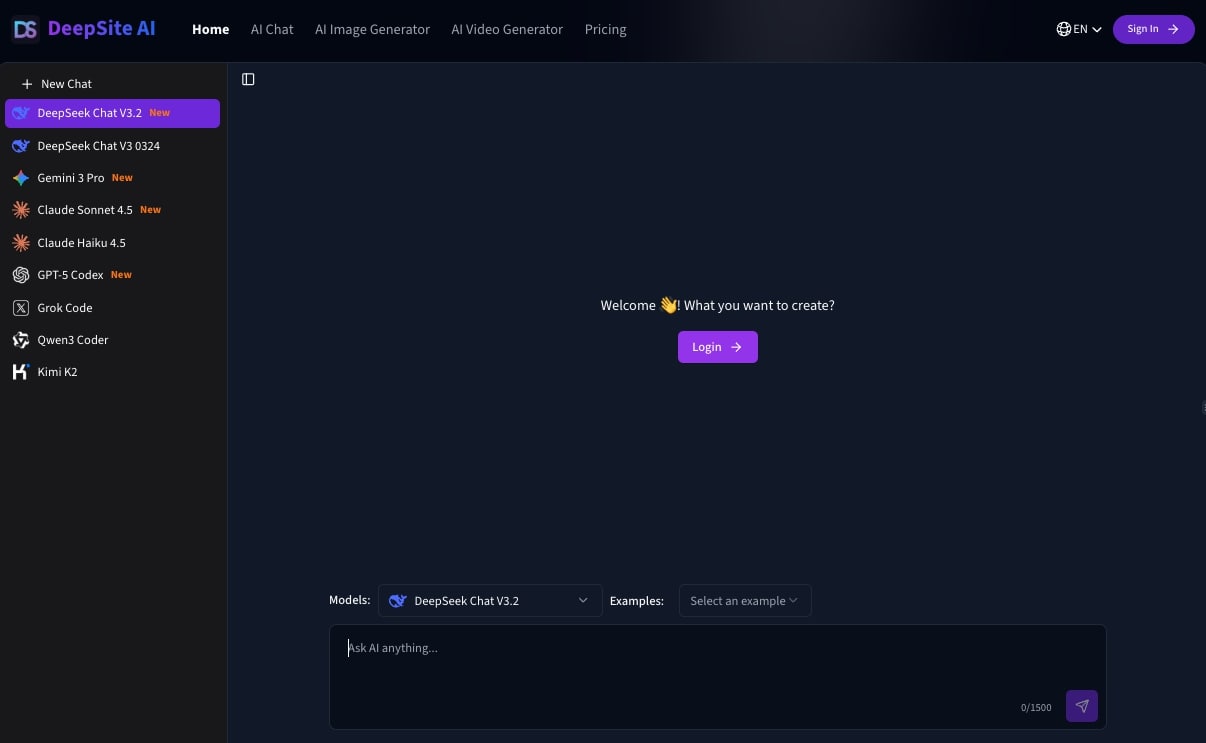
DeepSite is an AI website builder that allows you to leverage different LLMs like Claude, Gemini, DeepSeek, and Grok to build websites. It is built on top of DeepSeek, but it is an LLM-agnostic builder, something I don't see with other AI site building tools.
Similar to other vibe coding tools, you can use it to build blogs, marketing websites, portfolios, landing pages, and even ecommerce websites.
How DeepSite works
DeepSite works like any other vibe coding tool where you simply chat with it and tell it what you want to build. The platform then generates a responsive website layout, writes the code, and can even generate content for you.
It's built on top of DeepSeek, so if you like using that LLM, then this is a great platform. It also has everything built in from design editing and deployment.
Who is DeepSite for?
DeepSite is for anyone who is non-technical like a marketer or designer that wants to build simple professional websites with AI. It's also great for hobbyists that are tinkering with ideas for AI-generated websites.
It's also for those that like using DeepSeek and want to leverage its LLM capabilities to build websites with.
DeepSite pricing
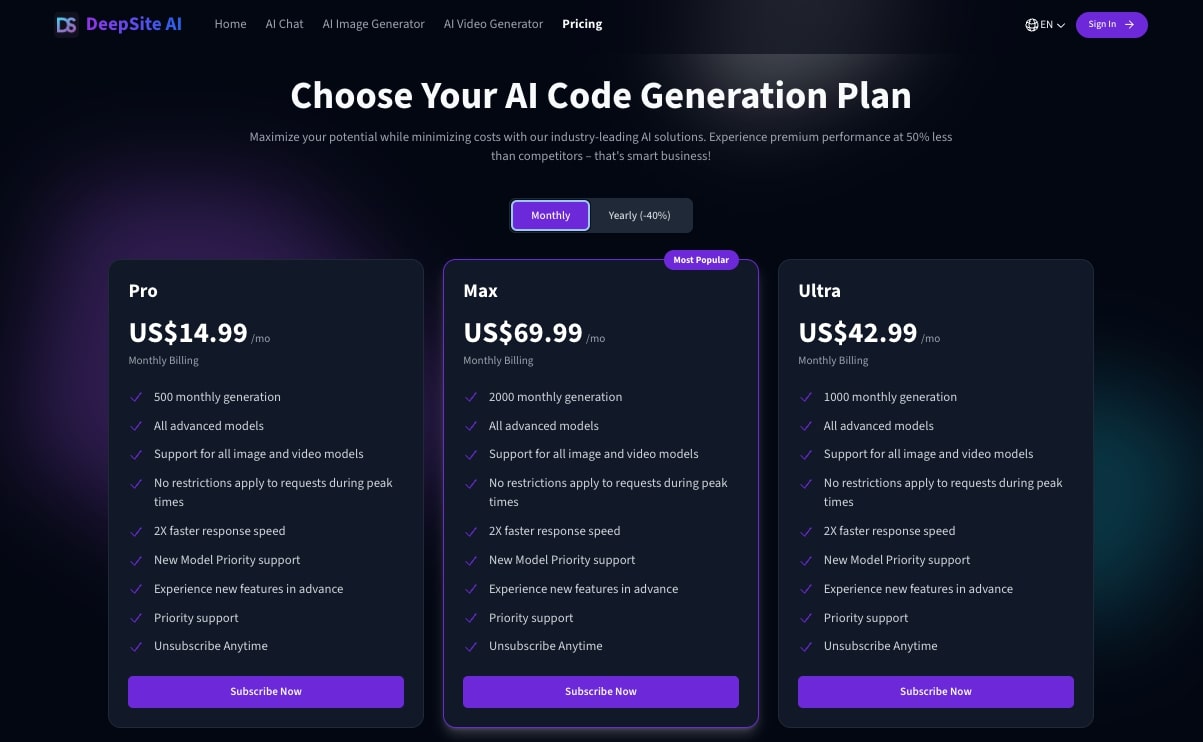
Here are DeepSite's pricing plans:
- Pro: $14.99/month with 500 monthly generations, all advanced models, support for all image and video models, no restrictions during peak times, 2X faster response speed, new model priority support, experience new features in advance, priority support
- Ultra: $42.99/month with 1,000 monthly generations, all advanced models, support for all image and video models, no restrictions during peak times, 2X faster response speed, new model priority support, experience new features in advance, priority support
- Max: $69.99/month with 2,000 monthly generations, all advanced models, support for all image and video models, no restrictions during peak times, 2X faster response speed, new model priority support, experience new features in advance, priority support
You can learn more about what each plan includes on their pricing page.
DeepSite pros and cons
Here are the pros of DeepSite:
- One of the few AI website builders that uses DeepSeek as its core AI model
- Has SEO features to help you build technically clean websites
- It's cheaper than most other AI website builders on the market
Here are the cons of DeepSite:
- When compared to other website builders like Framer AI or Lovable, there are limited design controls
- There's platform dependency on DeepSite, so it's hard to host your website somewhere else if you end up not liking the platform
Overall, DeepSite is a great tool for experimenting with websites generated with DeepSeek. I personally love Claude or Gemini as my LLM of choice for developing websites, but I wanted to include this in the list because I don't see a lot of other website builders built on top of DeepSeek.
DeepSite rating and reviews
Because DeepSite is still fairly new, there are no public reviews on third party websites. However, there is a great review by Daniel Ferrera that you can check out here.
9. Wegic
- Who it's for: Beginners, small business owners, agencies building websites for local businesses, students and freelancers
- What I like: Very easy to use for beginners, built specifically for local businesses, responsive web layouts by default
- Pricing: Free plan available with 30 credits, paid plans start at $23.9/month
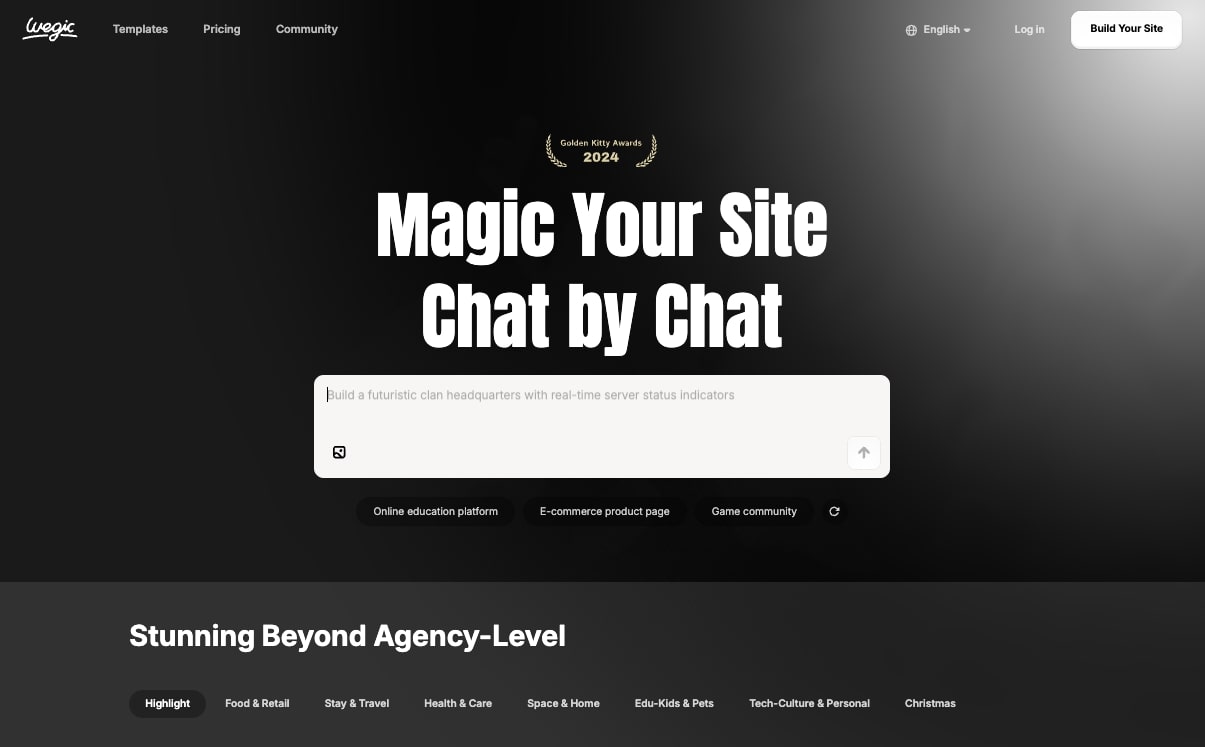
Wegic is an AI website builder that is great for agencies that create simple websites for local businesses. It's great for creating restaurant websites, healthcare websites, educational websites, or websites for your kid's local baseball team.
It's not as robust as some of the other tools that we went over, but that can actually be a good thing if you're a beginner and you just need something simple.
There's also a huge library of community-generated websites, so you can get tons of ideas of how others are using the platform.
How Wegic works
Similar to other tools on this list, you use Wegic by simply talking to the AI. It will ask you a series of questions about your site, then generates a site layout, designs the landing pages, and it can even write the copy for you. You will need to pay $2.99 to launch your initial website though.

After the AI does its thing, you can then manually edit the text or designs on the page. And from there, you can immediately host it either through a Wegic URL or a custom domain name.
Who is Wegic for?
Wegic is best for beginners, small business owners, and agencies building websites for local businesses. It's also great for students or freelancers that are building websites for small businesses (a great side hustle if you ask me).
It's very simple to use, even my mom can use it. So I highly recommend this to anyone that doesn't have a tech background but wants to dabble with building websites using AI.
Wegic pricing
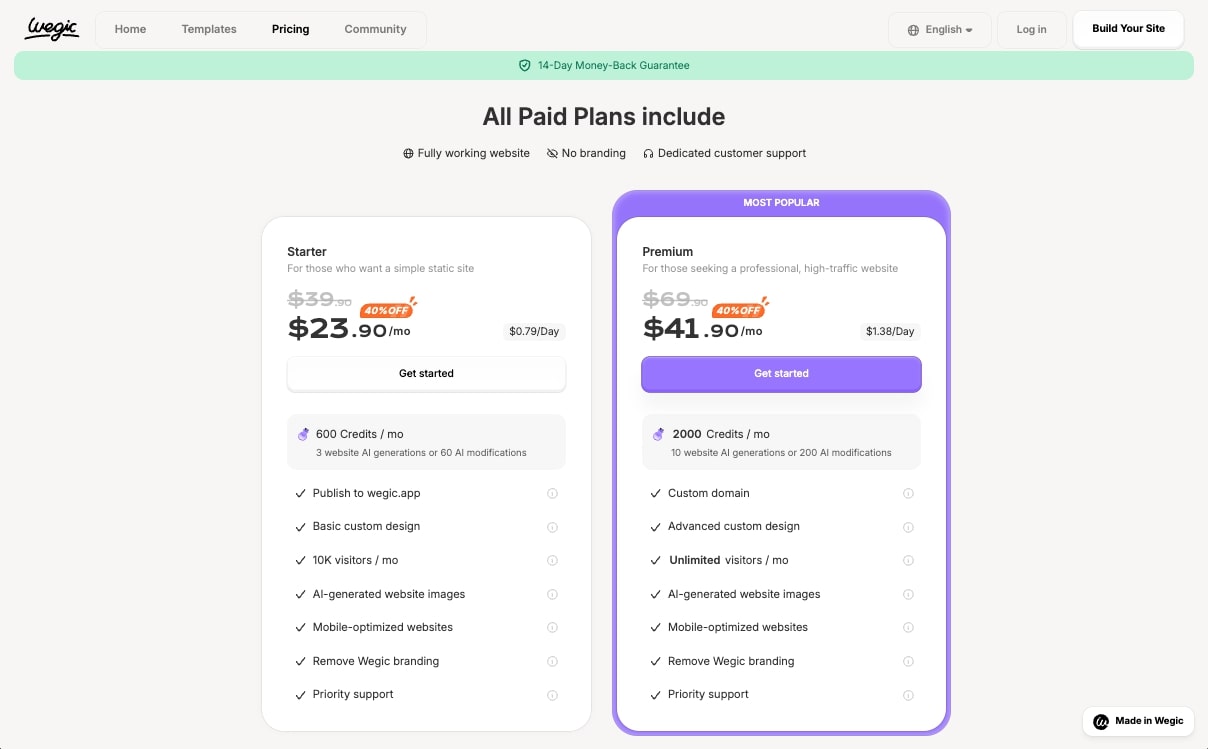
Here are Wegic's pricing plans:
- Free: 30 credits automatically when you sign up (invite friends for 100 credits each)
- Starter: $39.9/month (yearly 40% off = $23.9/month) with 600 credits/month, 10 websites, 10 pages per website, remove Wegic badge, 10K visitors/month, SSL certificate
- Premium: $69.9/month (yearly 40% off = $41.9/month) with unlimited credits/month, unlimited websites, unlimited pages, custom domain, remove Wegic badge, unlimited visitors/month, SSL certificate, Google Analytics
- Wegic Ultra: $2,999/month with 7-day delivery guarantee, advanced functionality integration, biweekly website data analysis reports, automatic content updates, permanent hosting, unlimited design revisions & code improvements
Wegic doesn’t explicitly show their pricing on their pricing page (I have no idea why), but they do have a blog post breaking down the costs. You can check it out here.
Wegic pros and cons
Here are the pros of Wegic:
- Very easy to use for beginners
- Built specifically for local businesses
- A full AI website builder with hosting built-in
- Creates responsive web layouts by default
Here are the cons of Wegic:
- There's limited control over designs and layouts, and manually editing them can feel a bit clunky
- It's not the best for vibe coding web applications or building an online store
- It's still a fairly new tool, so there may be some bugs here and there
Overall, this is a solid AI website builder if you're non-technical and you want to quickly build websites. If you have used Squarespace or Wix in the past, think of Wegic as an AI version of those tools.
Wegic rating and reviews
Here are what others say about Wegic on third-party review sites:
- Product Hunt: 4.2/5 star rating (from +25 user reviews)
- Trustpilot: 2.9/5 star rating (from +2 user reviews)
10. Dora
- Who it's for: Designers focused on creating animated websites, freelancers, creative agencies, those familiar with Figma or Webflow
- What I like: Timeline editor for 3D animations, keyframe positions and camera angles, scroll and hover animations
- Pricing: Free plan available, paid plans start at $18/month
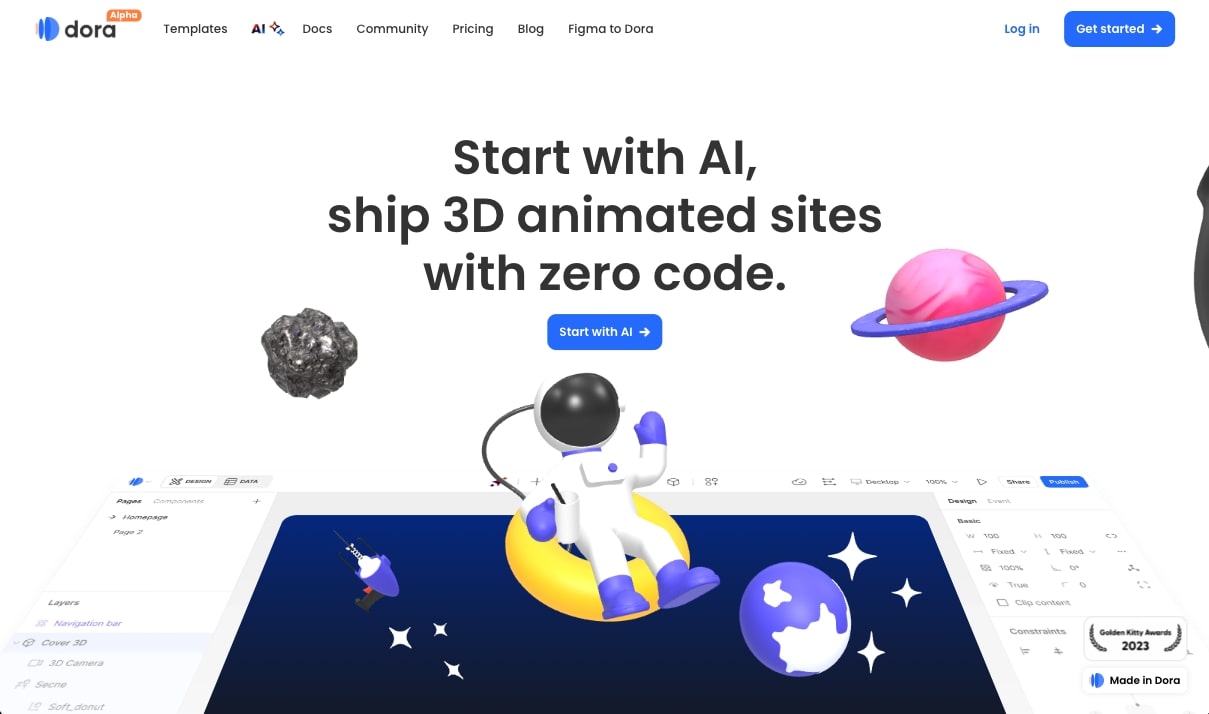
Dora is an AI website builder that is designed specifically for creating 3D animated websites. It's still a newer tool, but if you're a designer experimenting with scroll animations and complex interactions, this is a tool you definitely need to check out.
It's great for people wanting to experiment with creating crazy-looking websites that have all these scroll-based animations.
How Dora works
In Dora, you get a timeline editor where you can design keyframe positions, camera angles, and different design properties for 3D objects.
You then link those 3D objects to scroll or hover animations. It's like a mini Adobe After Effects meets a website builder.
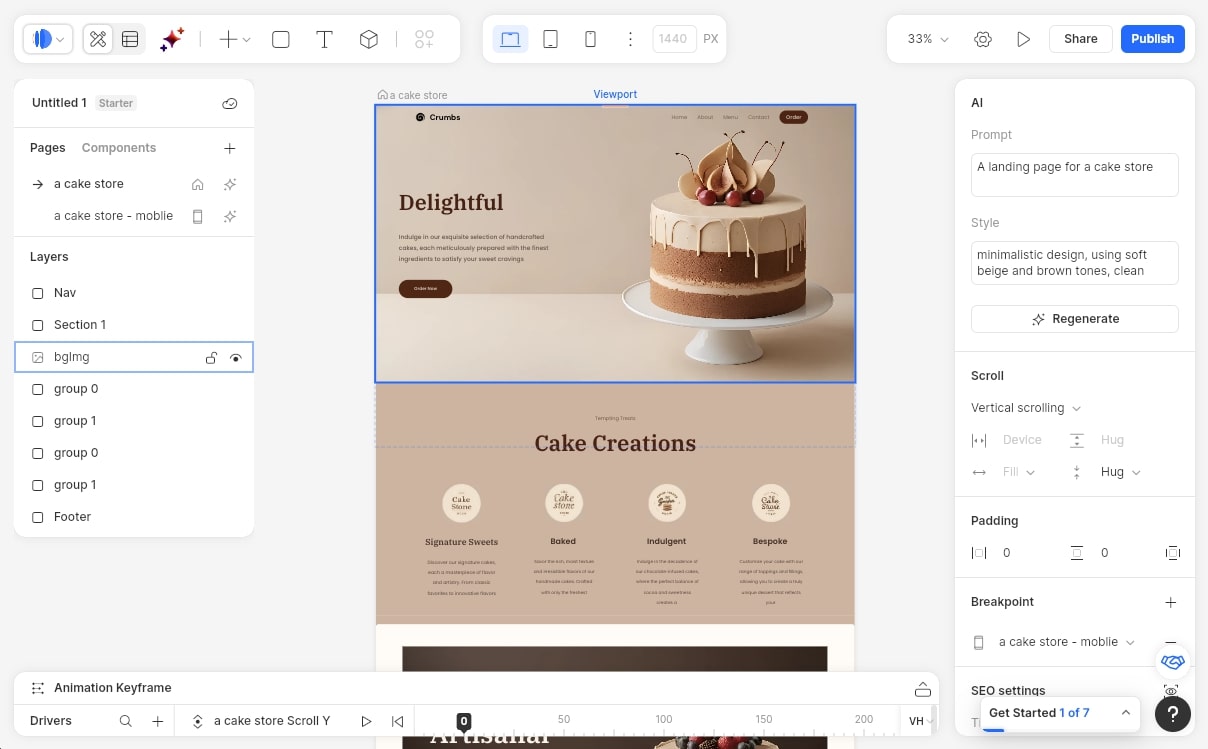
The cool thing is that it also uses AI, so you don't have to know how to code and this is a great entry point if you want to learn how 3D animations are created on websites.
Who is Dora for?
Dora is designed specifically for designers that are focused heavily on creating animated websites. It's not a beginner tool, but if you're a designer, freelancer, or even a creative agency that ships standout marketing websites, this is a platform you want to look into.
It's also great for those that already use Figma or Webflow and are familiar with general web design principles. If you understand visual emotion and how a layout is supposed to look in order to support these complex interactions, Dora is a great tool.
Think of it as the AI alternative to manually creating these animations.
Dora pricing
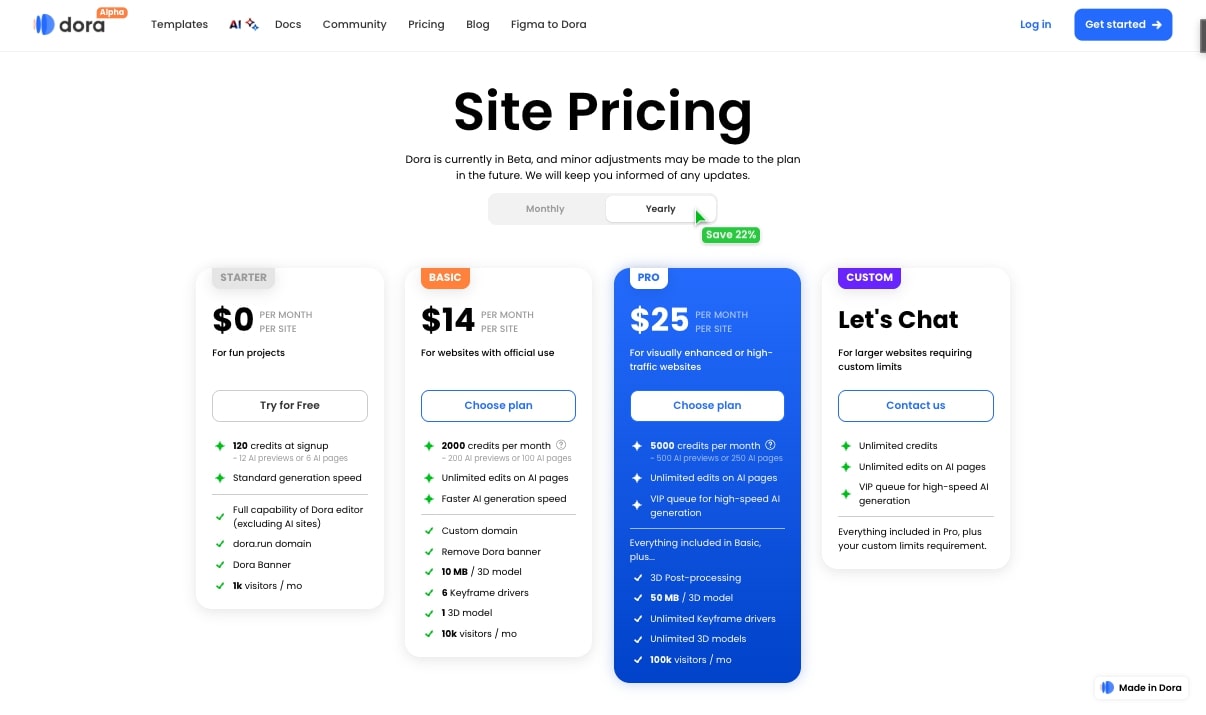
Here are Dora's pricing plans:
- Free: $0/month with 120 credits at signup (~12 AI previews or 6 AI pages), standard generation speed, full capability of Dora editor (excluding AI sites), dora.run domain, Dora banner, 1K visitors/month
- Basic: $18/month with 2,000 credits per month (~200 AI previews or 100 AI pages), unlimited edits on AI pages, faster AI generation speed, custom domain, remove Dora banner, 10 MB per 3D model, 6 keyframe drivers, 1 3D model, 10K visitors/month
- Pro: $30/month with 5,000 credits per month (~500 AI previews or 250 AI pages), unlimited edits on AI pages, VIP queue for high-speed AI generation, everything included in Basic plus 3D post-processing, 50 MB per 3D model, unlimited keyframe drivers, unlimited 3D models, 100K visitors/month
- Custom: Custom pricing with unlimited credits, unlimited edits on AI pages, VIP queue for high-speed AI generation, everything included in Pro plus custom limits for larger websites
You can learn more about what each plan includes on their pricing page.
Dora pros and cons
Here are the pros of Dora:
- Specialized tool for creating 3D animated websites with scroll-based interactions
- Timeline editor makes it easy to design keyframe positions and camera angles
- AI-powered, so you don't need to know how to code to create complex animations
- Great for learning how 3D animations work on websites
Here are the cons of Dora:
- Not a beginner-friendly tool, requires understanding of web design principles
- Focused specifically on animated websites, so not ideal for simple or static sites
- The learning curve can be steep if you're not familiar with animation concepts
Overall, Dora is an amazing platform if you're a designer wanting to create visually stunning websites with 3D animations and complex interactions. It's the AI alternative to manually coding these animations and a great tool for creative agencies looking to stand out.
Dora rating and reviews
Here are what others say about Dora on third-party review sites:
- Product Hunt: 4.6/5 star rating (from +45 user reviews)
Dora is still a fairly new platform, so there aren’t a lot of reviews from third-party sites.
What is the best AI to build websites?
The best AI website builder depends on what you're trying to build and your level of experience. Yes, shocker, I know.
If you're a complete beginner and you just want something user-friendly to spin up a simple homepage or landing page, I would go with Lovable or Wegic. They are incredibly easy to use and have great automation built in to handle the technical stuff for you.
But if you're a marketer or designer that cares about SEO and wants your site to rank well on Google, I would recommend using Relume with Webflow. The workflow is a bit more complex, but you get a seo-friendly site with all the hosting and performance benefits. I have seen this combo crush it in rankings for clients.
For those that want to build more complex web apps or prototypes, v0 and Tempo Labs are my top picks. They give you the most control over new sections, user experience, and the ability to integrate with backend databases and APIs.
And if you're building an ecommerce site, Atlas AI is the clear winner for Shopify dropshipping, along with Replo for standard ecommerce sites.
At the end of the day, the best thing you can do is just pick one and start experimenting. Most of these tools have free plans, so you can test them out without spending any money. The more you use them, the better you will get at prompting AI to create the exact website you have in your head.
Now stop reading this and go build your website already!
agree to our Terms.








Get the weekly newsletter keeping +33,000 marketers in the loop.