Slop. That's the word that comes to mind when I think of combining SEO and AI.
Well, at least, for the longest time it was.
As someone who's been doing SEO since 2016, led SEO at Webflow (from startup to $4.2B company), and now does full-time SEO freelancing, I have seen a lot of hype in this industry.
But early last year, I made it a goal to get good at using AI in my day-to-day work. And I decided that, over the span of a year, I was going to create a team of SEO AI agents to help me do my work faster (and better).
It started off as me trying to get AI to sound like me when I write. But unfortunately, that led to slop. And I actually don't use AI much for generating content. Like this blog post, it's 100% written by me.
I'm currently sitting in a Blue Bottle on Fillmore Street in San Francisco writing this. Click clacking away at my laptop keyboard.
But I have figured out how to "write" faster with AI. I have also figured out how to create really good content strategies, and I have also figured out how to automate some pretty tedious work when doing audits and finding low-hanging fruit to grow my clients' websites.
So in this article, I'm going to show you how to think about AI agents as it pertains to SEO work. I'll also show you how I created my own army of them (it's really easy). And from there, I'll give you actual examples of how I use them every week.
These are real, tried and true. I care deeply about the quality of my work and I have a 100% client success rate with SaaS companies here in SF and in NYC. So hopefully by now you know I'm not full of it.
I also have nothing to sell you. I am writing this for myself as much as I'm writing it for you. I want to make sure I document all the things I truly find valuable in a world of AI noise.
Okay, now let me explain what an AI SEO agent actually is. This way it can set the tone for the rest of the article.
What is an AI SEO agent?
An AI SEO agent is an AI assistant that helps with performing regular SEO tasks. You can create them for individual tasks across things like strategy, auditing websites, analyzing competitors, creating content, or even optimizing and growing conversions from existing content.
I want to be clear and say that an AI SEO agent is not a simple automation workflow. AI agents and automated workflows are two different things.
An automated workflow, think something you would create with Zapier, Make, or n8n, is a linear step-by-step procedure to complete a task. You connect nodes (apps) on a canvas and run your automations.
AI agents are not as rigid as automated workflows. If something breaks, they don't fail to run. They actually look for the best way to solve a problem. And instead of being triggered by an event, like a workflow is, they are triggered by prompts a user inputs in a chatbox.
So with an AI agent, you basically have an assistant that has access to specific tools in your tech stack, an LLM model (for its AI capabilities), and instructions (also called skills) that tell the agent how to behave.
And this is a really important concept to understand. Because you can't just tell ChatGPT or Claude "you are an SEO expert" … "do X, Y, and Z." You have to define what an SEO expert is. How they think, all the edge cases they'll come across and how to handle them, etc.
So with that, let's go over how to build your own SEO AI agent.
How to build an SEO AI agent in 5 simple steps
In order to create an AI agent that actually works and has a really good output, you first must be an expert in the thing you are teaching your AI agent to do.
Please read that again.
You must first be an expert before you can create an AI agent that is really good.
That's why it took me over a year to build my AI agents. I knew a lot about SEO, but it took a while to figure out how to document everything I knew and how to give that context to a dang robot to understand.
So here is exactly how I would build an SEO AI agent:
- Document your manual workflows
- Ask ChatGPT or Claude to turn those workflows into skills files
- Choose an AI agent framework
- Give your agent the skills and tool access (via MCP)
- Set the prompts that trigger each individual agent
Let me briefly go over each.
1. Document your manual workflows
First step is to document what you do in your SEO workflow. The best way I found to do this is to start fresh with a new project.
Whether that's a new client you're onboarding (how I did it), a new company you're working at, or a new personal project you're starting.
Start from the beginning and go through the proper order of operations to launching a successful SEO campaign. This is the best way to not get overwhelmed and lost in all the steps.
SEO can have a lot of moving parts so you want to make things simple and not overthink it.
For me, this meant I go through these steps each time I work with a new client:
- Understand what the company does, who its ideal customers are, and what categories they need to dominate to attract those customers
- Build out a full content strategy for their website
- Create outlines for each individual page
- Go through the regular content creation process
- Publish and optimize things over time by keeping an eye on analytics
These are the highest ROI things I do with each website I work with. And mind you, I don't need AI for any of it. AI just now helps speed things up a bit.
That's the position you want to be in if you want to use AI and not just create a bunch of slop that will inevitably get you penalized.
So that's step one, list out the steps.
2. Ask ChatGPT or Claude to turn those workflows into skill files
There is a good chance you're already using an LLM like ChatGPT or Claude while you're doing your SEO work. And these tools have your chat history.
So what you need to do is tell the LLM that you want to create a system skill prompt for {insert an area of your workflow}. You can give your LLM of choice this prompt (make sure to edit the bracket part):
I want to create instructions for a system skill prompt that I can give to an AI agent. This will be specifically for {identifying what pages on my site are losing traffic so I can know what pages to update.} Based on this, interview me on literally anything: my exact process, technical implementation, concerns, tradeoffs, etc. From there, let's create a system skill prompt in a markdown format.
Remember, replace the brackets in that prompt with your own use case. I added one of mine (that I will show you in the use cases section of this article). But the goal here is to have AI help you write instructions for the AI.
I know, very meta lol.
But it works. And when you ask it to interview you with questions, it will help you think through the process. And you want to be as detailed as possible. Try using the voice dictation feature and just ramble everything out that you know on how you approach that workflow.
The result is an instruction document, in a markdown format, that we will give to our AI agent to be an absolute beast at that very specific SEO task.
And we replicate this exact process for each individual task in the SEO workflow. For me, it's 7 different skills (I'll show you all of them so keep reading).
But I recommend you just start with one first and walk through the whole process of creating your AI agent before you move on to creating a full army of them.
3. Choose an AI agent framework
Once you have your instruction file(s), you need to find a platform that you can ship your AI agents on. I wrote a blog post on all the best AI agent platforms right now, but let me just give you the ones that I have personally been using.
For simple AI agents that don't need to be shared with anyone on your team, I would use Claude. There is a lot of talk about Claude Code right now. And it is amazing for software development tasks.
But for SEO, I would just use the regular Claude chat. You want to download the desktop version. And then create a project for each individual website you're working on. From there, you want to add the skills from step 2 into the instructions box.
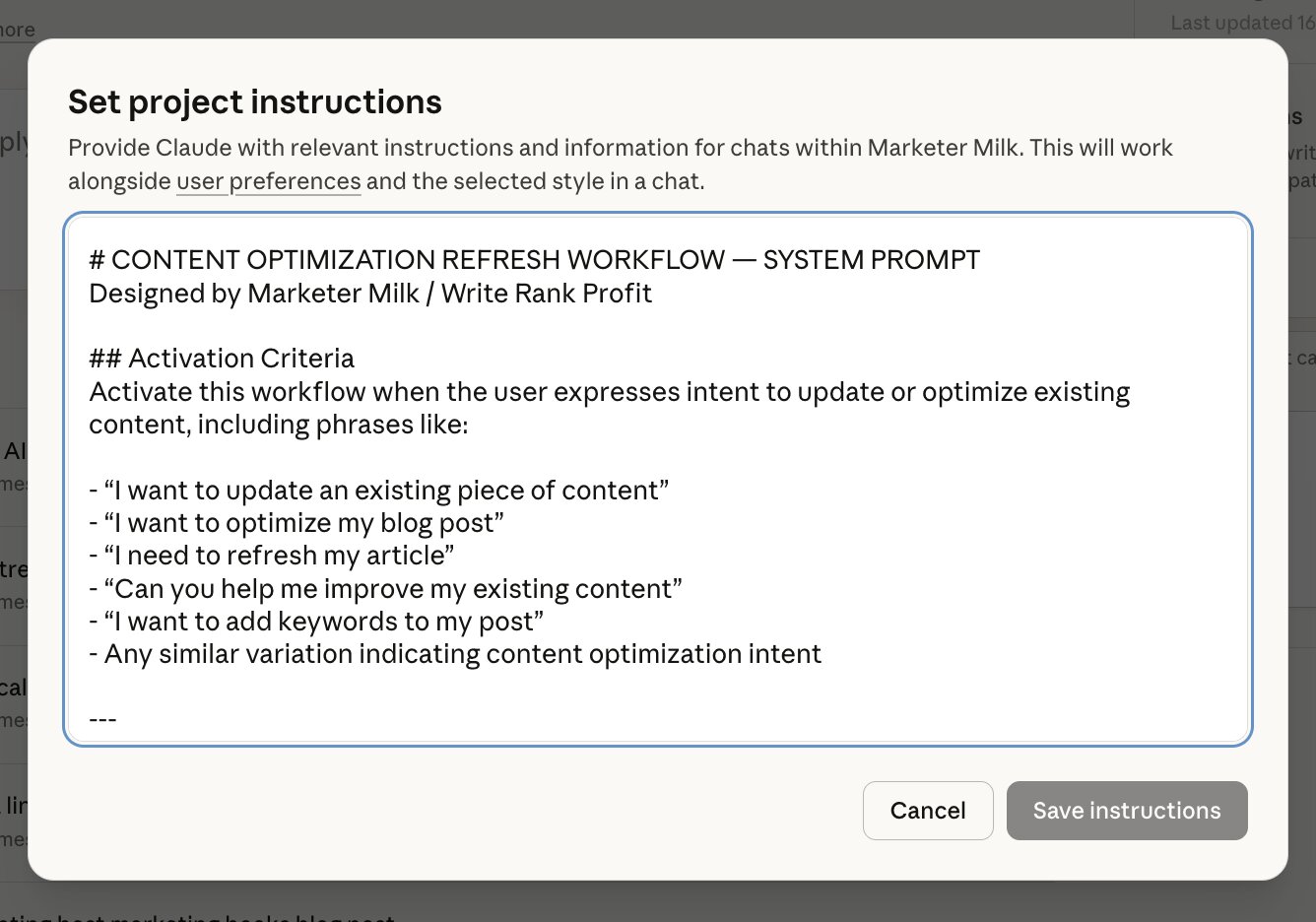
This way, when you ask for a specific task in the chat, it will trigger and reference the appropriate skill.
Now, note that you are locked into Anthropic's AI models when you use Claude projects to run your agents. But I think Claude is honestly the best when it comes to out-of-the-box AI agent tasks. And their Opus model is incredible.
(Not sponsored by them or anything.)
But if you want your AI agent to be LLM agnostic (meaning it can run on different models from different brands), you're going to want to use a third-party AI agent builder. This way, you can also share your agent with other members of your team.
So if you're the SEO lead or expert at your company, you can create the agents and then pass them along to your team members.
If you need to go that route, I would use Gumloop to build your SEO AI agents. It has the same chat interface as Claude, but in Gumloop you can select from models from ChatGPT, Gemini, Claude, DeepSeek, Grok, and others.
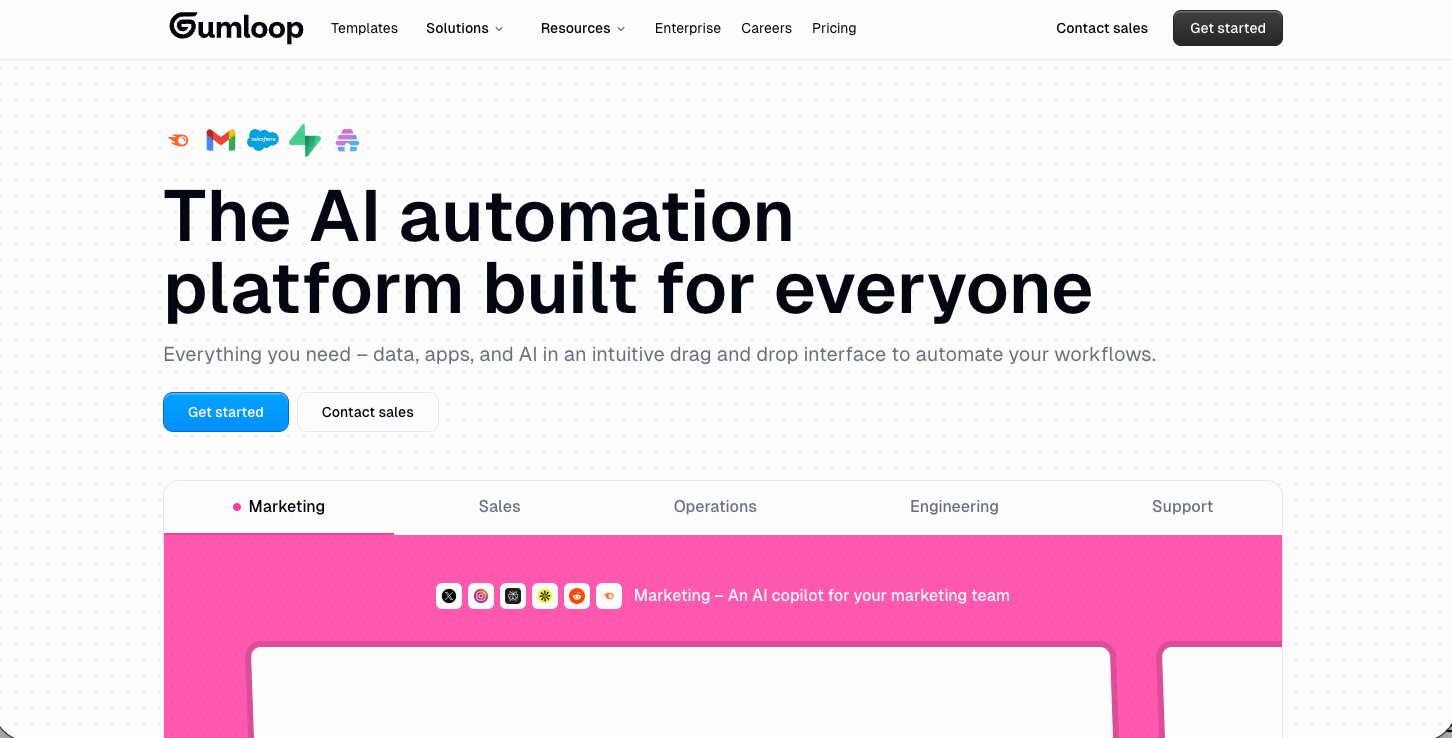
You can also connect different SEO tools like Semrush (built in natively into their platform), Google Docs/Sheets, Notion, and other tools that you might already be using for SEO-related tasks.
But I would first start with a simple Claude project if you're a solo operator (like myself). And then I would move to Gumloop if you want to scale and orchestrate a multi-agent system that can also be shared with others.
3. Give your agent the skills and tool access (via MCP)
So you have your skills files and you have your AI agent framework picked out. Now you need to give your agent the ability to actually do things beyond just chatting with you.
This is where MCP comes in. MCP stands for Model Context Protocol, and it's basically a way to connect your AI agent to external tools and data sources through an API. Think of it as giving your agent access to other tools you use. Without MCP, your agent can only talk. With MCP, it can pull real-time data, interact with your tools, and take action on your behalf.
For example, I have my Claude project connected to tools like Ahrefs and Webflow through MCP. So when I ask my agent to analyze a site's backlink profile or pull organic keyword data, it can actually go get that information instead of me having to screenshot it or copy and paste it into the chat (or hallucinating some random stats).

This is what makes AI-powered SEO agents different from just prompting into a chatbot. You're not going back and forth feeding it information. The agent already has access to what it needs.
In Gumloop, connecting AI tools through MCP is even more visual. You can browse their integrations, connect things like Semrush, Google Sheets, or Notion, and your agent can read and write to those tools directly.
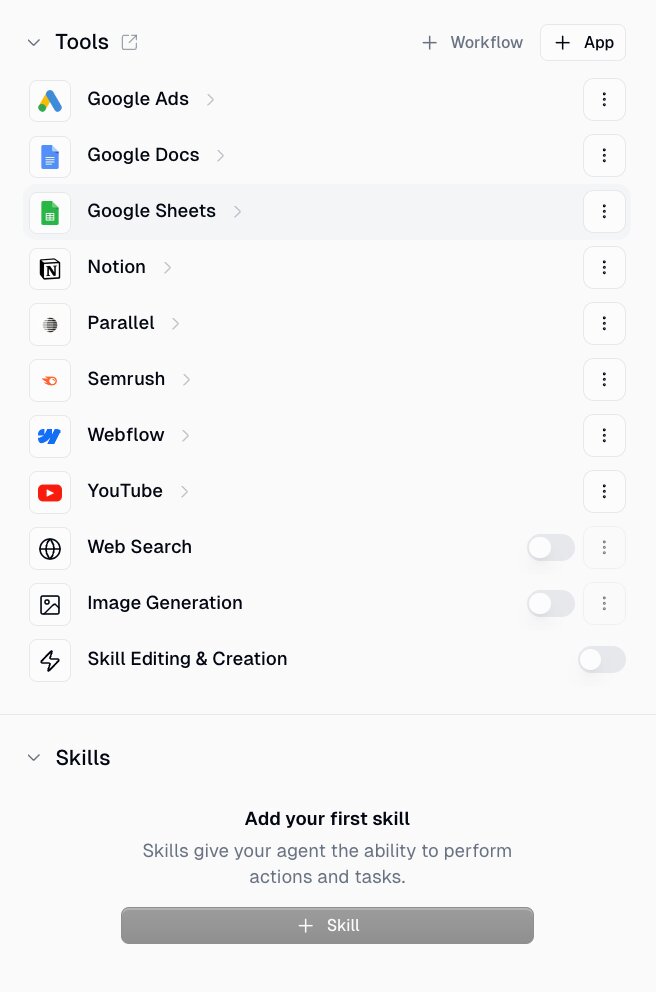
So if you wanted your agent to run an internal linking audit and then log the recommendations in a Google Sheet with structured data, it could do that in one go.
The key thing to remember is that MCP connections are what turn a chatbot into an actual agent. Skills tell it how to think. MCP tells it what tools to read or write to.
4. Set the prompts that trigger each individual agent
This part is actually baked into the skills files themselves. Inside each skill, you define the activation criteria, which is basically the phrase or intent that tells the agent which skill to use.
For example, when I type "new blog post" in the chat, my agent knows to activate the blog post builder skill (I’ll show you this in the next section).
When I say "update this page" and paste a URL, it triggers the content optimization skill (I’ll also show you this). When I say "speech to text," it knows to just proofread my dictation without changing my voice.
You don't need to set up some complicated routing system. You just write the trigger conditions into each skill file and the agent handles the rest. It's really that simple.
And this is why having clearly defined, separate skills matters. Each one has its own activation criteria, its own instructions, and its own behavior. So you end up with one project that can do a lot of different things depending on what you ask it.
Okay, now let me show you all of this in action with real AI agents I’ve built for SEO tasks.
7 use cases for SEO AI agents I use on a weekly basis
Here are the top SEO AI agents I use:
- Topical authority agent
- Content strategy agent
- Content decay analyzer
- Content updater
- CRO agent (custom code embeds)
- Blog post builder
- Speech to text proofreader
Alright, let me show you how each one works.
1. Topical authority agent
- What it does: Shows where your website has topical authority so you can find new content opportunities that will rank high fast
- When to use it: You want to help scale SEO traffic and conversions for a website that already has some results from SEO
- What it needs: The topical authority skill and a CSV of your Google Search Console data
Topical authority is one of the most important ranking factors when it comes to SEO. And I truly believe it’s also the best thing you can do if you want to build a brand and be well known in your niche.
Topical authority is when you go out and create content around different topics within a niche. And the more content you have related to a specific thing, the more traditional and AI search engines will see you as an authority in that space.
When you achieve topical authority it’s amazing.
Your content not only starts to rank faster, but also higher. But for this specific agent, I only really use it when I’m working on a website that already has traffic and conversions from SEO.
This topical authority AI agent’s job is to help you find more content opportunities to expand on. So it’s great if you’re a freelancer, agency, or a new hire working on a site that has asked you to help them scale.
When set up in Claude, this agent is triggered each time I say something related to “topical authority analysis”. It takes a CSV export from my Google Search Console data. And from there, it generates a report as a Claude Artifact.
Here’s an example of the artifact it generated for Marketer Milk:
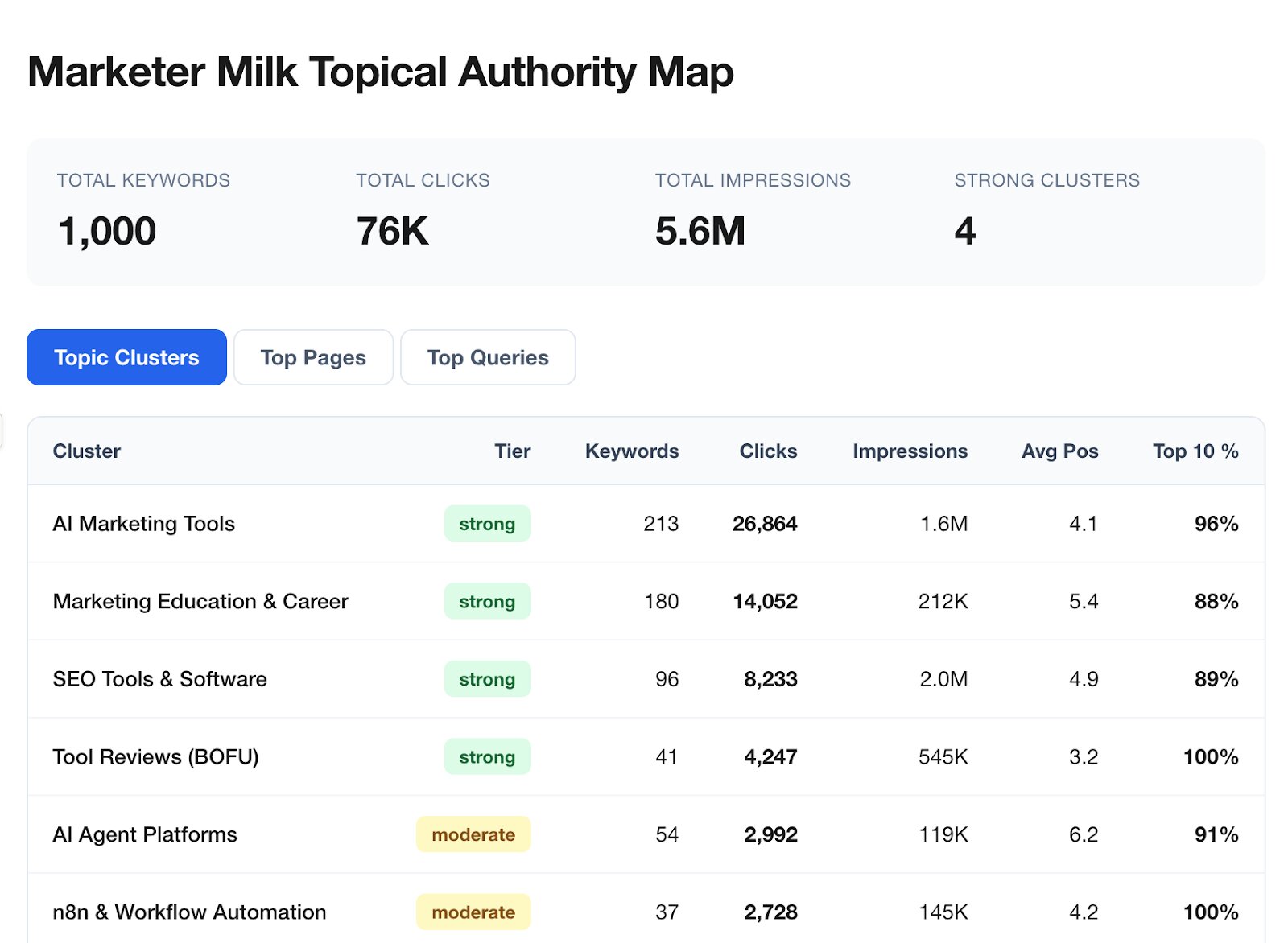
As you can see, this is really powerful. This can help me know where Google sees my site as an authority. And it can help inform what new content to expand on. Which brings us nicely into my second use case…
2. Content strategy agent
- What it does: Creates a content strategy that is personalized to your website and focused on driving conversions
- When to use it: When you're trying to figure out what keywords to go after and create content for
- What it needs: The APTK Framework skill, your website URL, user-defined ICPs, user-defined product features or services
Knowing what content to create is arguably the most important thing in SEO. Whenever I see a failed SEO campaign, the first culprit is a bad content strategy. The second is bad content, but we'll get to that in the later use cases.
But many times, companies don't know how to approach SEO. It feels like a black box. And they are always getting gifted by someone selling them something they don't need. I'm talking to you AEO/GEO agencies and tools.
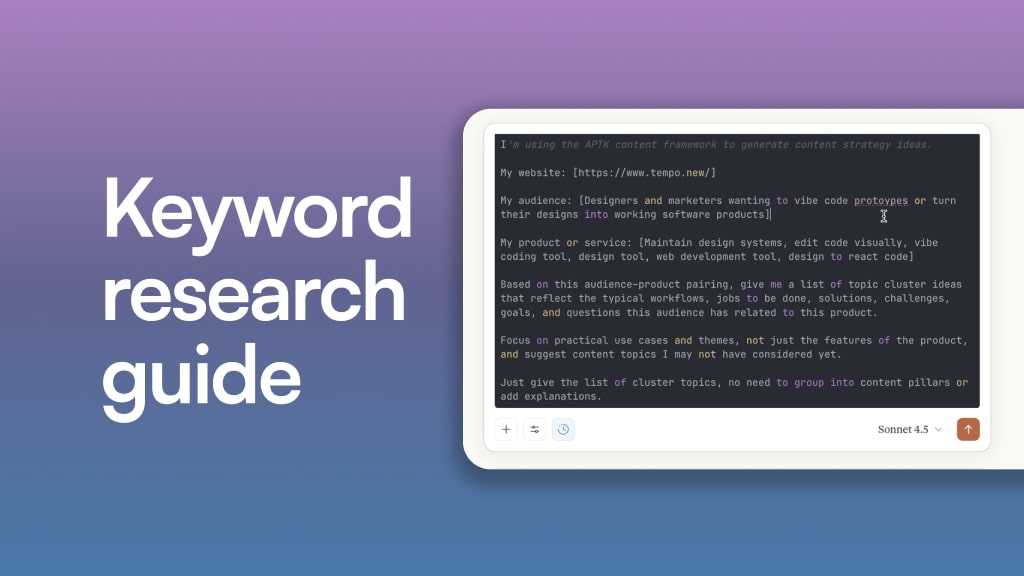
So what makes a good SEO strategy? Over the past 6 years, I have compiled this into something I call the APTK Framework. It stands for Audience, Products, Topics, Keywords.
So I made an AI agent that is an expert on the APTK Framework. It can deeply understand the target audience for a company, figure out what products and services they sell, and come up with topics to target based on that Audience/Product pairing.
And from there, it can integrate with the Ahrefs MCP for Claude (or the built-in Semrush integration if you use Gumloop), to uncover real keywords based on your topics.
And if you use the topical authority analysis agent from the first use case I showed, you can feed those topics in to get new keyword ideas.
The end result is a list of keywords that are designed to bring your ideal customers to your website organically. And I have trained the AI agent to focus heavily on the bottom-of-the-funnel keywords so it gives you a conversion-focused strategy (not just vanity traffic metrics).
I actually made a full YouTube video on how this AI SEO agent works, along with the full skill prompt. You can check it out here:
And if you're more of a reader, you can check out the blog post I wrote on this specific use case too.
I'm really proud of this one because it's my entire strategy on how to create a content calendar that wins every time. And it took my entire career to come up with and tweak throughout the years. The fact that I was able to turn it into a markdown file and give it to a robot to replicate still blows my mind.
3. Content decay analyzer
- What it does: Finds which pages on your website are losing rankings and traffic
- When to use it: Every 3-6 months, run this to find what content needs to be updated
- What it needs: The content decay skill and your Google Search Console data
Everyone in SEO knows that the lowest-hanging fruit is to go back and update your previous blog posts. SEO is like a garden. You plant seeds, water them, and watch them grow over the months.
But if you stop watering your garden, weeds will grow, and your flowers will eventually die.
Same with SEO. It's not a set-it-and-forget-it thing. It can be in the short term. Like you can create a piece of content and not think about it again for months. But if you have content that ranks well and gets a decent amount of organic traffic, you should keep an eye on it every couple of months or so.
Often, your content will decay and lose rankings over time. Either due to the fact that the page is old or that competitors have created fresher content that is better. Sometimes both happen. Ouch.
Regardless, you need to figure out which pages are losing traffic so you can update them. This is where the content decay detector agent comes into play. You feed it your Google Search Console data, and based on the skill prompt it knows exactly what to look for.
Manually, this would mean comparing traffic to individual pages over a 3-6 month period and looking at which ones have the highest negative delta in traffic. This shows which pages have lost traffic or average ranking positions.
I’ve actually also taken this skill and built my own internal SEO tool with Claude Code for this. Here’s what it looks like for my website:
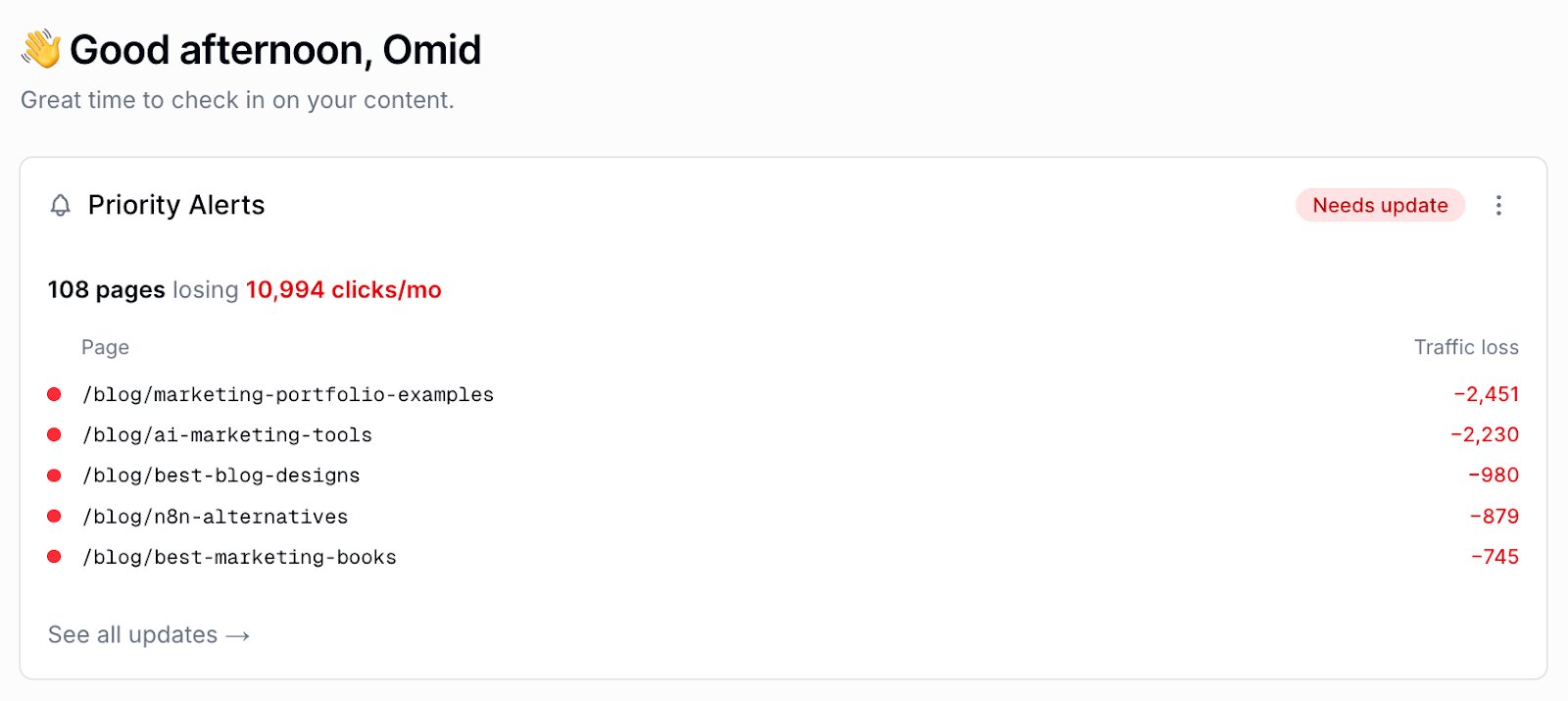
Once the agent has identified what content is decaying, it can then send that information to the content updater agent, which will tell you exactly what to do to update the web page.
4. Content updater
- What it does: Tells you exactly what to update on a page that is losing traffic, including keyword placement, meta titles, headings, internal links, and outdated information
- When to use it: After the content decay analyzer flags pages that need attention
- What it needs: The content updater skill, your Google Search Console data, and a CMS with MCP access if you want the agent to make edits directly
When updating content, there are a few different protocols SEOs go through. While it can look different for every piece, the baseline is usually:
- Go into GSC and use the compare feature to see which pages are losing traffic
- Pick a page to update and look at what keywords the page ranks for that have lots of impressions but low clicks
- Take those keywords and sprinkle them into the existing piece of content
- Update some other stuff related to intros, meta titles, headings, outdated info, broken links, etc.
- Republish it with a new publish date
And it works. Like really well. In fact, I have done this flow and have seen 100% increase in traffic to individual pages consistently.
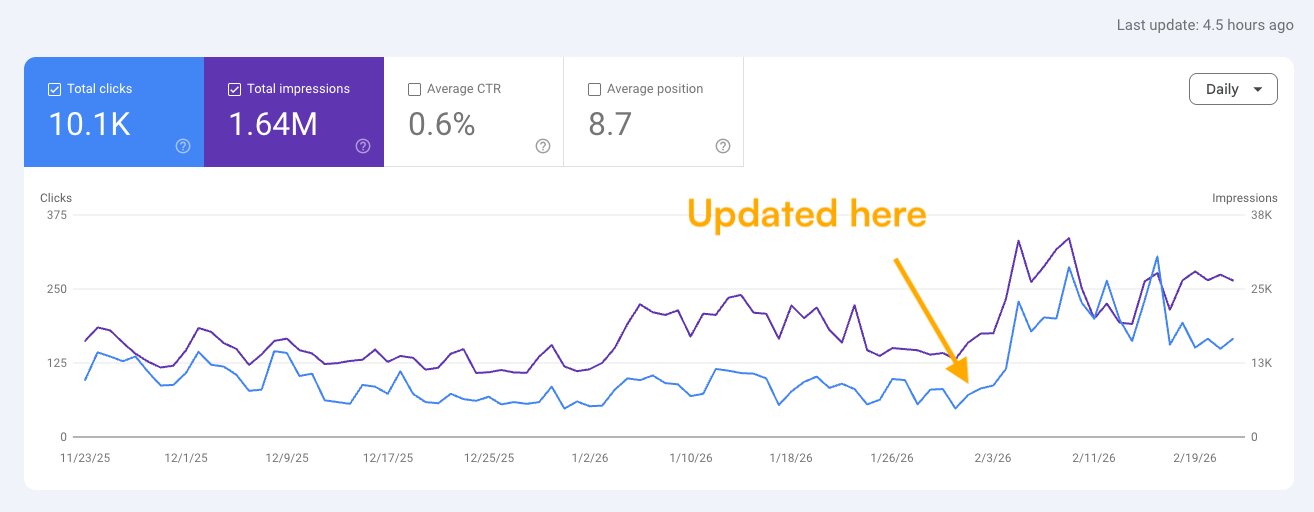
And from the steps outlined above, you can see that it's a fairly straightforward workflow. It ingests real data (from GSC), it has a skill around how to identify what to update, and you go and make those changes.
Now, all you do is replace the last part, you (or me), with an AI agent.
The content updater SEO agent can look at GSC, read our skill for this task, and then tell us exactly what to update. And if your CMS has an MCP server, you can also have Claude or Gumloop make the edits for you.
I actually made a YouTube video on this exact process (with the full skill prompt). You can check it out here:
It's honestly one of my favorite use cases for AI agents because it has all the right elements. And it's not writing content for us from scratch, which is still something I don't think is a good idea if you really care about building brand equity.
But it can help with all those tedious updates as your library of content scales. Content decay is inevitable, so if you're a large website with existing ranking pages, this can be a huge value add.
5. CRO agent (custom code embeds)
- What it does: Analyzes your pages and creates custom code embeds like CTAs, calculators, and comparison tables to increase conversions
- When to use it: When you have pages ranking well but want to get more business value out of that traffic
- What it needs: The CRO skill, your CMS details, and examples of what success looks like on your site
Next up is a CRO agent. If you work in SEO and you're not thinking about how people convert, you should.
All the work we do, from creating a content strategy, writing content, and getting it to rank, is only as valuable as the business impact it drives. For most businesses, that's turning SEO traffic into leads, users, or customers.
Creating a CRO (conversion rate optimization) AI agent for your SEO efforts is how you can "milk" as many conversions from your traffic as possible. I have personally used this to help grow the conversion rate of individual web pages for my SaaS clients.
For example, you might have a blog post that ranks really high for a category term. You need CTAs that get people to click and interact with your product.
And these can range from not only CTAs, but also tools. For example, Ramp (the fintech company) has a tool built right into their blog post:
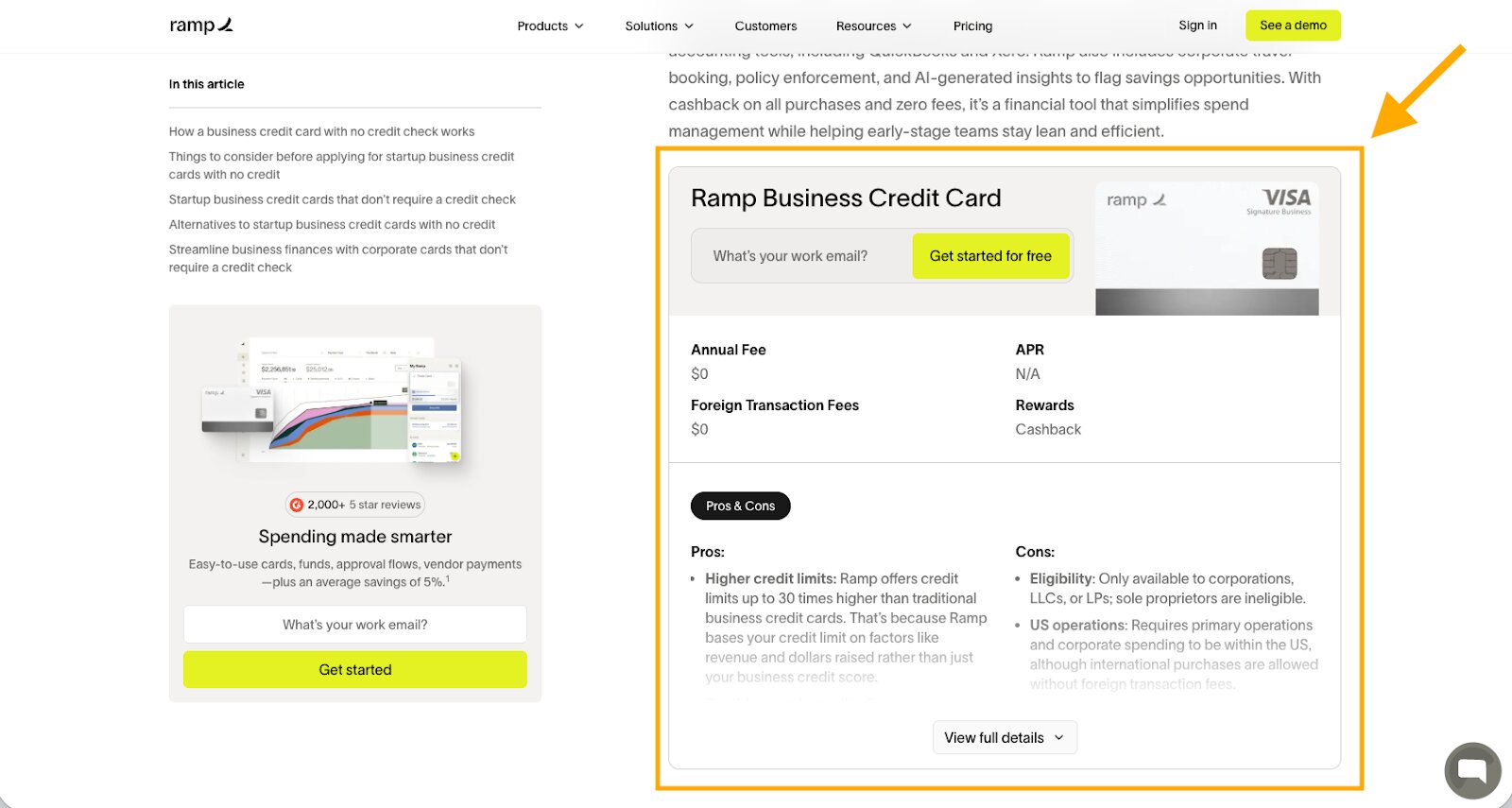
These are a great way to get people to actually interact with your blog content (or landing pages) on your website. And the more people interact with the page, the better user signals it sends to Google. Which in turn makes those pages rank even higher for their target keyword.
I have also done this for simple CTAs. For example, in my Clearscope review article, I have this callout:
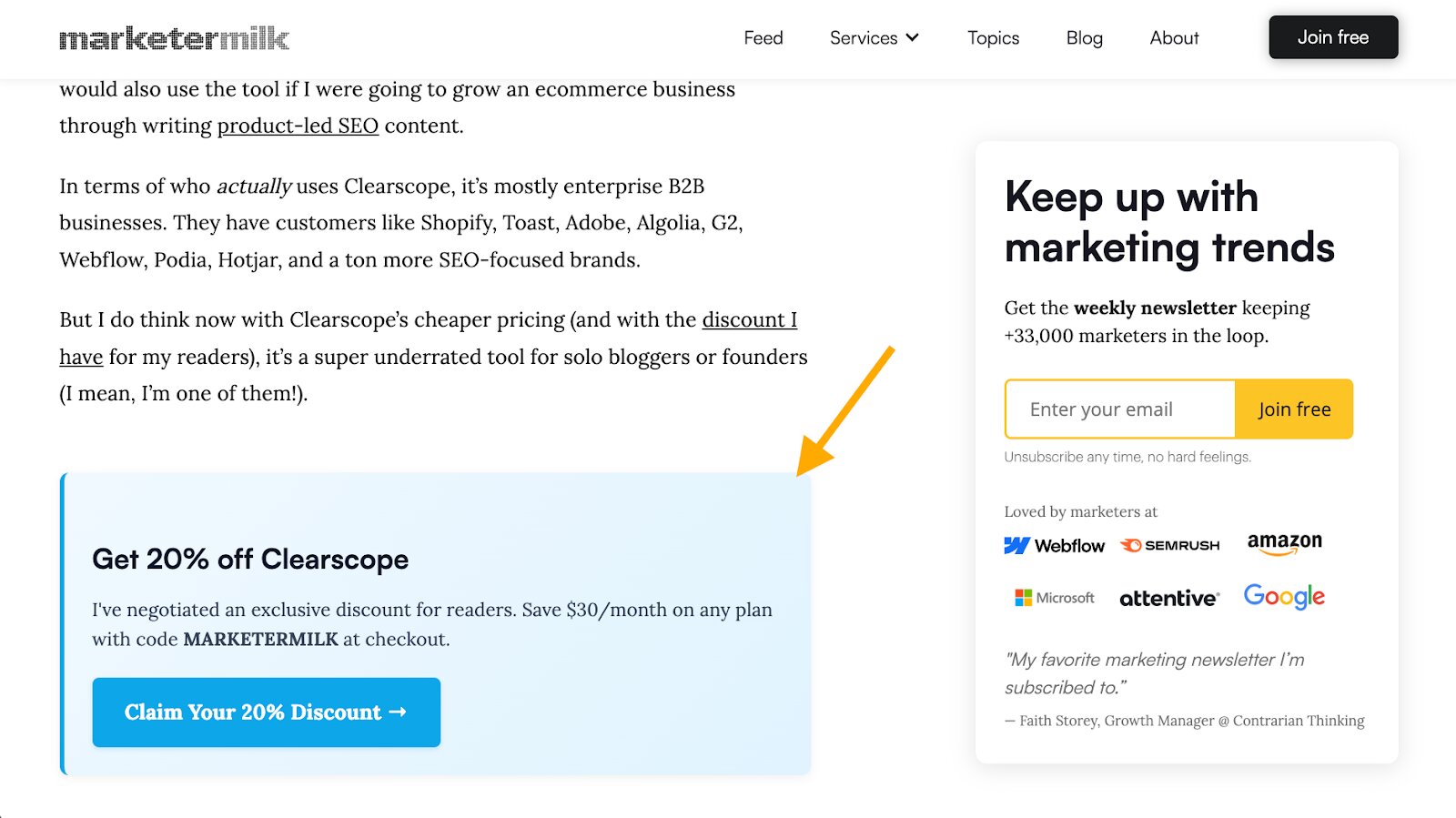
And all of these CTAs, calculators, or comparison tables are simply custom code embeds. Claude's coding agent, inside their chat feature, can easily create these for you.
Just talk to Claude and tell it the CMS you're using and that you want to create a custom code embed for whatever use case.
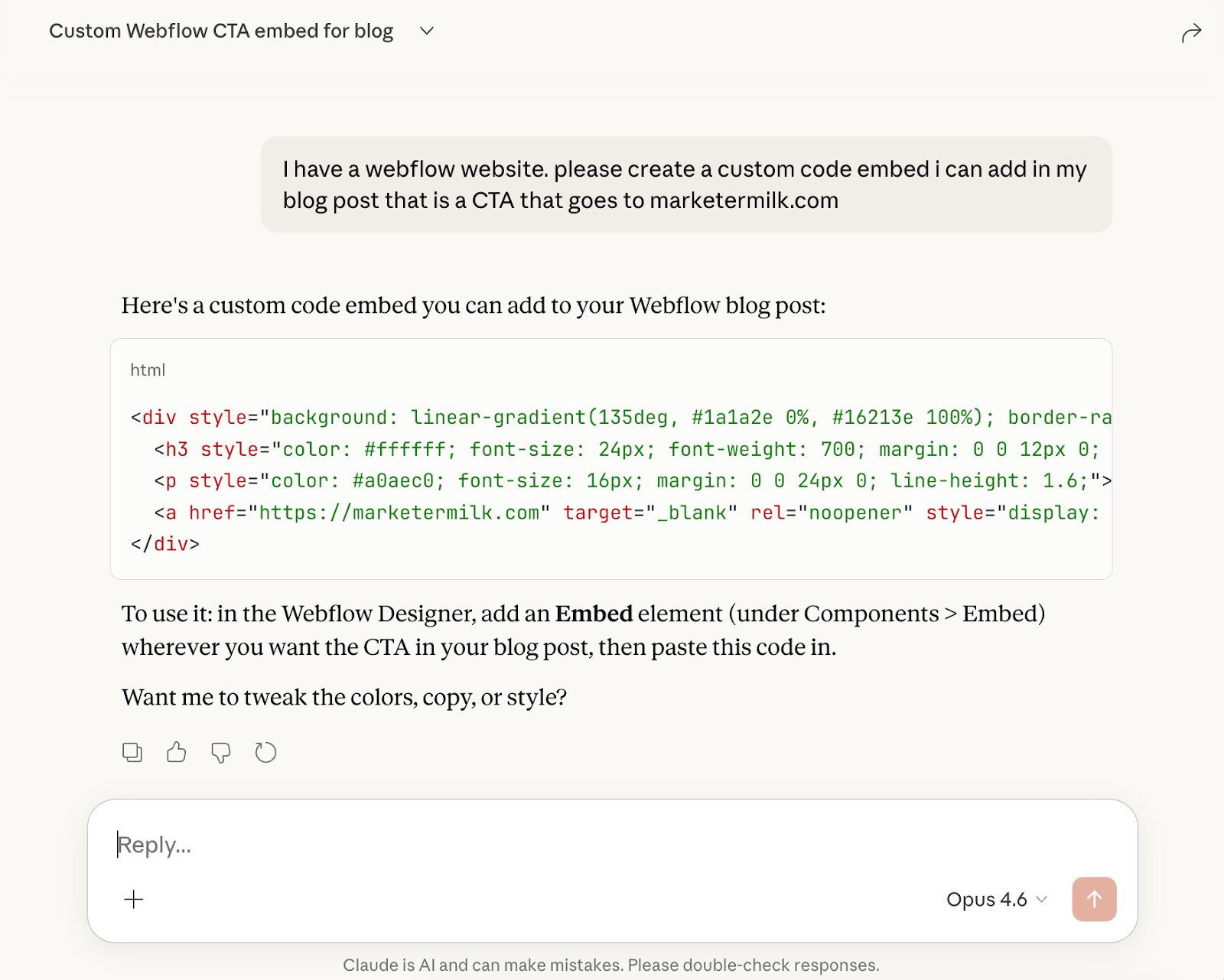
If you use Claude Code you can also create a design system so it matches your brand as well. But in Claude chat, you can get pretty far with simple custom code embeds.
You can also use Claude, or create a CRO agent with Gumloop, that can analyze an existing web page on your site and give you recommendations on what to improve to increase conversions.
AI is actually surprisingly good at CRO stuff if you already have pages on your site that perform well and you can give it some context and ideas of what success looks like.
And from there, you can expand the functionality of this agent to go out and execute on those tasks for you. There really is no limit to what you can get the agent to do as long as you can teach it.
6. Blog post builder
- What it does: Creates a detailed content outline based on your specific blog post format and standards
- When to use it: When you're starting a new blog post and need a structured outline fast
- What it needs: The blog post builder skill, a target keyword, and optionally existing content or pages for reference
Look, I'm not a fan of using AI to generate content to publish AI slop articles. But AI can be used to help you outline content and give you direction.
However, AI is not good at just giving you an outline if you simply ask it. At least, it's not up to my standards. I prefer my own manual outlines over AI any day.
But if you have a format for how you approach blog posts, you can easily create an SEO AI agent that has a skill on a particular format.
For example, I have this set up as SEO skills for my agent:
- One central "controller" skill that is triggered when I tell the agent I'm working on a new blog post
- It then asks the target keyword and identifies the format: best listicle, how-to, review article, etc.
- It then fires a "child" skill that is related to the blog post format (this is a template for a specific type of blog post format tailored to my existing content)
This means I can get a consistent outline, based on the standards I have trained the agent on, really fast.
I have the agent walk the user through a series of steps to help gather information on the piece.
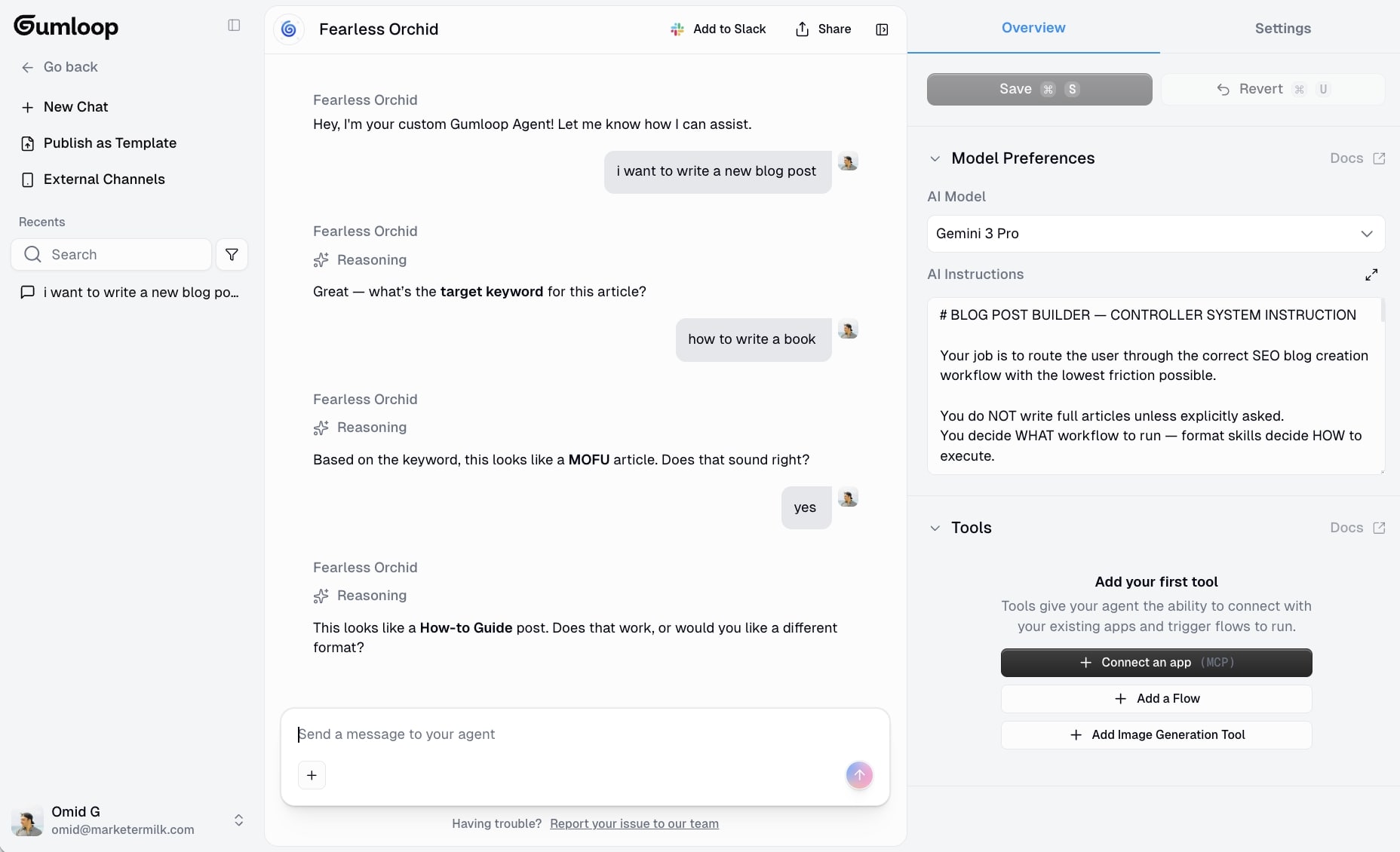
From there, it creates an outline. I can also give it existing content I have written so it can fetch those pages and figure out the outline template.
You can also give it competitor articles to create a content outline template from those pages. But I personally don't like looking at competitors. It's not my style and I always rank better when I focus on how I would approach the piece without being influenced by what others are doing.
But you do you.
Either way, this agent is for outlines and it works. But an outline is not a completed article. So that's where the next agent comes into play.
7. Speech to text proofreader
- What it does: Proofreads your speech-to-text drafts for grammar, spelling, and punctuation without changing your voice or writing style
- When to use it: Every time you dictate a blog post or any piece of content
- What it needs: The speech-to-text proofreader skill and your raw dictated text
I have saved the best for last.
And I have also mentioned a million times that AI slop content is no good. Can it rank? Yeah, sometimes that stuff can rank depending on factors like your domain authority, how many people are creating content around that topic, and its overall competition.
But if someone in your niche targets the same keyword and writes an amazing article from lived experience, along with engaging copy that gets the reader to trust them, they will outrank you in the long run.
So you might as well focus on building a good reputation. That will be your moat in SEO.
But I won't sit here and act like AI is not important and that SEOs should turn a blind eye to it for content creation. For better or worse, we are all being encouraged to be more productive and use AI.
So I created a speech-to-text proofreader agent to help speed up my content production time. Instead of using AI to one-shot generate a piece of text, and then editing it after (I think this is so backwards), I speak out my blog posts (using my own experience on the topic) and then I use an AI agent to edit it.
Here is the exact prompt I use:
Proofread this for grammar, spelling, and punctuation only. Don't change my voice, tone, word choice, or sentence structure. Just fix the technical errors from speech-to-text.
And when I use this, it does not rewrite the way I talk and add random em dashes or whatever. It takes my raw speech and it just cleans up the grammar so there aren't a bunch of mistakes.
So now instead of it taking me 3 hours to type out a blog post, it takes me 45 minutes to speak it out.
Yeah, I know, it's not something that happens in like 5 minutes. It still takes close to an hour because I talk through each section slowly and I pause in between so I don't ramble. But being 3 times faster is something I'll take.
The best SEO AI agent tools
I have mentioned a few tools throughout this article, but let me give you a proper rundown of the best options for building SEO AI agents right now.
Claude

This is what I personally use every day. Claude projects let you add custom skills, connect tools like Ahrefs and Webflow through MCP, and run everything from keyword research to content optimization in one chat.
The Opus model is incredibly good at following detailed instructions. Which is exactly what you need when you're building agents that handle things like competitor analysis, schema markup generation, or technical SEO audits.
It's also the best I have found at maintaining your brand voice across longer workflows. If you're a solo SEO or freelancer, this is where I would start.
Gumloop
If you need to share your agents with a team or want to use different LLMs, Gumloop is the move.
It has Semrush built in natively, so your agents can pull real SERP data, keyword volumes, and SEO performance metrics without you having to export anything. You can also connect Google Analytics, Google Sheets, and other tools your team is already using.
It's the best option if you want to build a multi-agent system that other people on your team can actually use.
Perplexity
Perplexity is not really an agent builder, but it's worth mentioning because it's useful for SEO research.
If you need to quickly understand how AI search engines are answering queries in your niche, or you want to see what sources are being cited for specific topics, Perplexity is great for that. It also integrates with Gumloop, so you can build it into your agent workflows for automated research.
I use it more as a research companion than an actual SEO agent. But understanding how AI search works is important if you want your content to be SEO-optimized for both traditional and AI search results.
I hope by now I’ve made you realize that you don't need the fanciest SEO automation tools to get started. Pick one tool, build one agent with one skill, and go from there. The value comes from the quality of your skills and your expertise, not from the platform you choose.
A year ago, AI and SEO meant slop to me. Now it means I can do my work better, faster, stronger. Well maybe not that, I got that song stuck in my head. But better and faster for sure.
Your real experience and real voice still matter. And that’s the competitive advantage you have. So if you can scale that with AI agents and create mini versions of “you” that’s what will win.
Now go build some SEO AI agents.
agree to our Terms.










Get the weekly newsletter keeping +33,000 marketers in the loop.